

How to Automate SharePoint Folder Creation from Opportunities?
Your CRM creates hundreds of Opportunities. Each one needs a SharePoint folder. Manually creating and naming those folders - every single time, for every single deal - is one of those tasks that nobody questions until someone adds it up and realises the team spends hours per week on pure overhead.
CloudFiles eliminates this. The moment a new Opportunity is created in Salesforce, CloudFiles triggers a Flow action that creates a correctly named SharePoint folder and automatically links it back to the record. Get CloudFiles on AppExchange
The Problem with Manual Folder Creation
Beyond the time cost, manual folder creation introduces inconsistency. One rep creates 'Acme Corp - ERP Deal'. Another creates 'ERP Deal - Acme'. A third drops files in the root because they couldn't find the right folder. Six months later, SharePoint is a mess, and nobody trusts the folder structure.
Automating from Opportunity fields guarantees consistency. Every folder is named the same way, in the same place, every time.
How the Automation Works
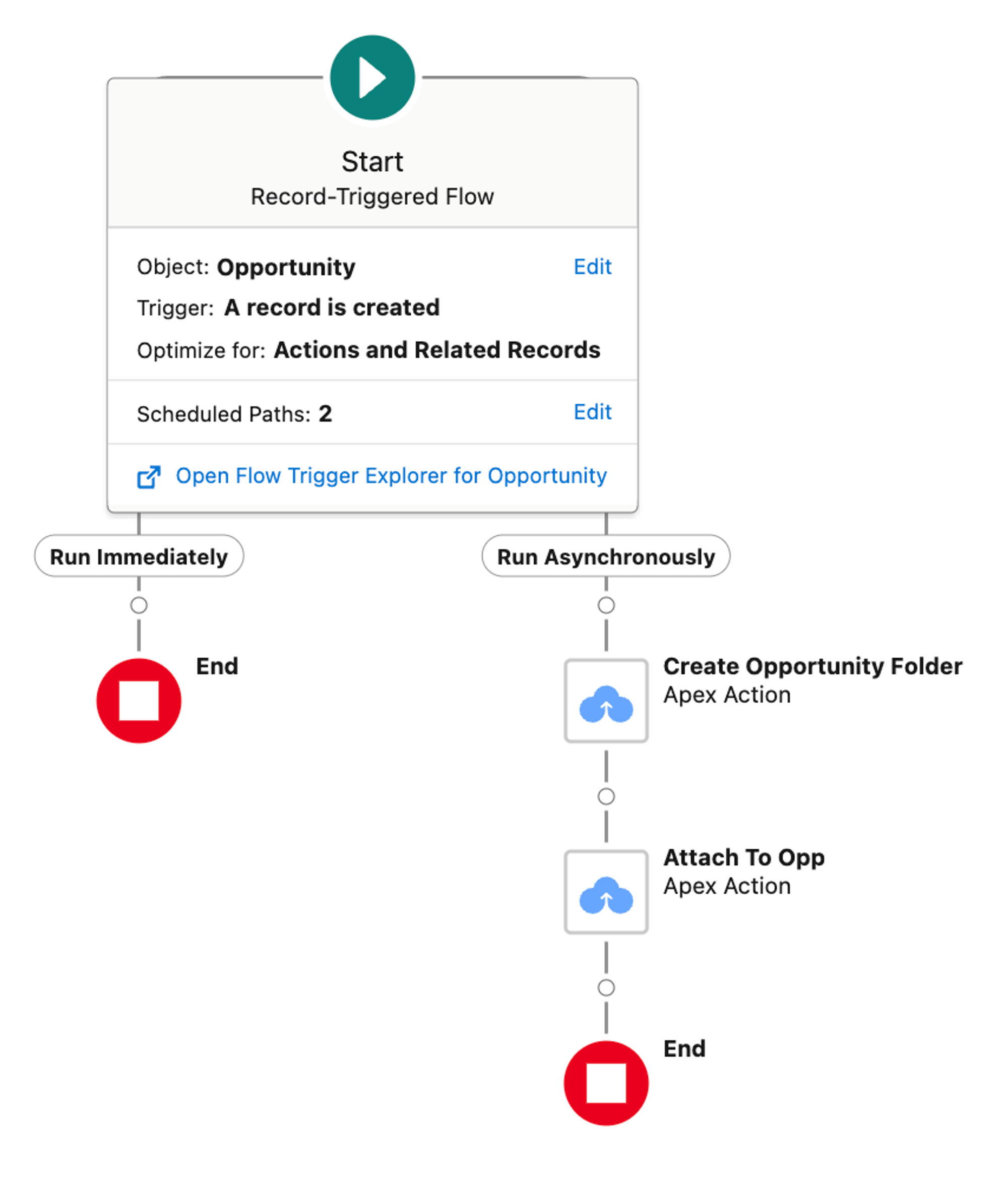
CloudFiles uses a Record-Triggered Salesforce Flow configured as follows:
- Trigger: Opportunity Created (or stage change, or any condition you set)
- Action: CloudFiles "Create and Link Folder" action
- Folder path template:
Opportunities/{!Opportunity.Account.Name}/{!Opportunity.Name}_{!Opportunity.CloseDate}
The folder is created in your SharePoint document library, named from the Opportunity's live field values, and linked to the Salesforce record in the same Flow run. It takes under 10 minutes to configure.
Adding Sub-Folder Structure
Most teams need more than a single folder per deal. CloudFiles lets you configure sub-folders at creation time - Contracts, Proposals, Invoices - using the Copy Resources action to duplicate a SharePoint folder template. Every new Opportunity folder arrives pre-structured, ready for files.
For Opportunities nested under Accounts, where the Opportunity folder should live inside the Account's folder, CloudFiles supports nested folder automation based on Salesforce object relationships.
When the Opportunity Name Changes
Deal names change. CloudFiles handles folder renames, too - when an Opportunity name is updated in Salesforce, a Flow action can rename the corresponding SharePoint folder automatically. Your folder structure stays in sync with your CRM data.
Prefer Code?
Developers can trigger the same folder creation via Apex invocable methods or CloudFiles' REST API, useful for complex trigger logic that Flow can't express cleanly.
Related Links
- The Ultimate Guide to Salesforce SharePoint Integration
- Looking to Integrate Salesforce with SharePoint? Try CloudFiles
- Automate File Uploads from Salesforce Opportunities to SharePoint
- Move case attachments to SharePoint in Salesforce
- Salesforce CRM Content Explained: Admin, Architect & Developer Guide
Feel free to book a demo
Frequently Asked Questions
Can Salesforce automatically create SharePoint folders for Opportunities?
Yes. CloudFiles can automatically create SharePoint folders whenever a new Opportunity is created in Salesforce using Record-Triggered Flows, Flow actions, Apex, or API-based automation.
How do I automate SharePoint folder creation from Salesforce Opportunities?
Using CloudFiles, admins can configure a Salesforce Flow that triggers the “Create and Link Folder” action whenever an Opportunity is created, updated, or reaches a specific stage.
Can SharePoint folders be named dynamically using Salesforce fields?
Yes. CloudFiles supports dynamic folder naming using Salesforce field values such as Account Name, Opportunity Name, Close Date, Region, Owner, or custom fields.
Example:
Opportunities/Account Name/Opportunity Name_CloseDate
Can Salesforce automatically create nested SharePoint folder hierarchies?
Yes. CloudFiles supports automated nested folder structures based on Salesforce object relationships, such as:
- Account → Opportunity
- Opportunity → Contracts
- Opportunity → Proposals
- Custom Parent → Child Objects
Can I automatically create SharePoint subfolders for every Opportunity?
Yes. CloudFiles can automatically create predefined subfolders like Contracts, Proposals, Invoices, Legal, or Customer Documents whenever a new Opportunity folder is generated.
What happens if the Opportunity name changes in Salesforce?
CloudFiles can automatically rename the linked SharePoint folder when the Salesforce Opportunity name changes, ensuring SharePoint stays synchronised with CRM data.
Does this require coding or development?
No. Most SharePoint folder automation workflows can be configured using Salesforce Flow and CloudFiles Flow Actions without writing code.
Can developers automate SharePoint folder creation using Apex?
Yes. CloudFiles supports Apex invocable actions and REST APIs for advanced SharePoint folder automation scenarios beyond standard Salesforce Flow capabilities.
Can SharePoint folders be linked back to Salesforce records automatically?
Yes. Once CloudFiles creates the SharePoint folder, it automatically links it to the Salesforce Opportunity, allowing users to access SharePoint documents directly from the CRM.
Why automate SharePoint folder creation from Salesforce?
Automating SharePoint folder creation helps organisations:
- eliminate manual folder setup
- maintain consistent folder structures
- reduce operational overhead
- improve document organization
- simplify file retrieval
- scale document management processes across sales teams
Can CloudFiles support custom Salesforce objects for folder automation?
Yes. CloudFiles supports automated SharePoint folder creation for both standard and custom Salesforce objects.
How quickly can automated SharePoint folder creation be configured?
Most Salesforce admins can configure automated SharePoint folder creation using CloudFiles in under 10–30 minutes using prebuilt Flow actions and setup tutorials.
Can CloudFiles create SharePoint folders based on Opportunity stage changes?
Yes. Folder creation can be triggered based on any Salesforce condition, including Opportunity creation, stage changes, Closed Won status, approvals, or custom workflow logic.
Does CloudFiles work with SharePoint Online and Microsoft 365?
Yes. CloudFiles supports SharePoint Online and Microsoft 365 environments for Salesforce document management and folder automation workflows.