
One hour on the documents that hold every loan up
Join Techforce Services and CloudFiles for a live session on handling loan application documents inside Salesforce: the problem, a live demo, and your questions.
How lenders and broker groups are cutting days out of client onboarding
A live session on handling loan application documents in Salesforce, with CloudFiles and Techforce Services.
Every loan application arrives as a stack of documents
Payslips, bank statements, ID, tax returns, trust deeds, valuations. For lenders, broker groups, mutual banks and credit unions on Salesforce, the work on them often happens outside it, in inboxes, shared drives and spreadsheets. The loan record is updated by hand afterwards, and the client waits.
Opened one by one
Someone opens every document just to work out what it is.
Checked by hand
Each one is compared with what the applicant declared, then keyed into the loan record.
Chased late
Gaps surface late, the client is asked again, and the file goes back in the queue.
The problem, a live demo, then your questions
One hour, in three parts.
Where the time goes
Techforce Services sets out where onboarding time goes in a typical lending process on Salesforce, from the application arriving to the loan record being ready.
- Ravi Telu, Techforce Services
Document automation for Salesforce, live
CloudFiles takes a set of loan application documents and processes them inside a Salesforce org, live.
- Adarsh Reddy, CloudFiles
Ask both teams
Bring questions about your own application process. Ravi and Adarsh answer them live.
- Ravi Telu and Adarsh Reddy
What you will see
Read, classified and split
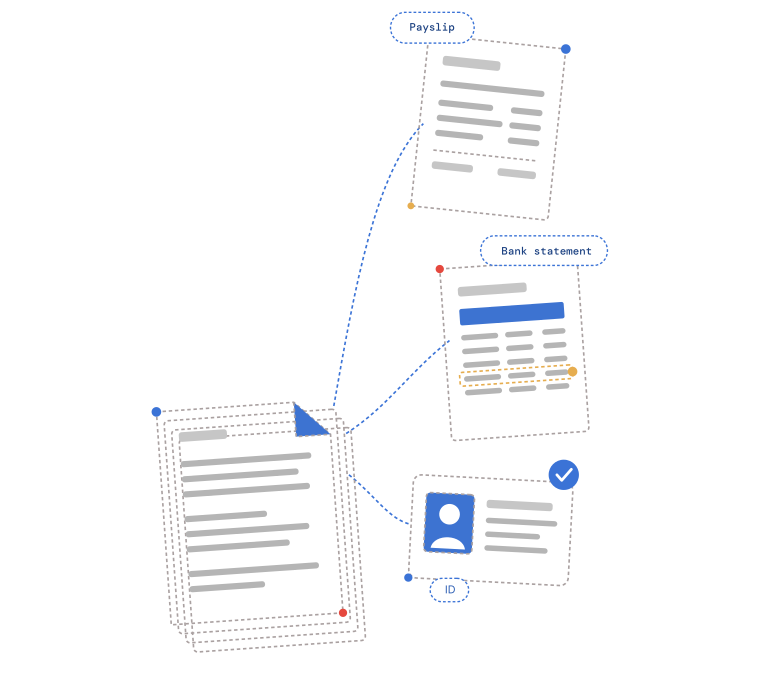
Upload one PDF and it becomes a payslip, a bank statement and an ID, each filed in the right place.
Matched against the application
Each document is checked against the loan record, and anything missing or inconsistent is flagged.
Held for review, fully audited
Anything that needs sign-off waits for a person, and every step is logged.
All inside Salesforce
It runs on the records your team already uses, with no separate system to check.
Who is presenting




Save your seat
Wed 21 Oct 2026, 3:00 PM AEDT (2:00 PM in Brisbane, 12:00 PM in Perth). One hour, online, and made for:
- Salesforce admins at lenders, broker groups, mutual banks and credit unions
- Lending operations and onboarding teams
- The IT and operations leaders they report to

You're registered.
Check your inbox: Zoom is sending your joining link. We'll remind you the day before and an hour before it starts. Can't make it live? Stay registered and we'll send you the recording.
Questions about the webinar
3:00 PM AEDT in Sydney, Melbourne, Canberra and Hobart, 2:30 PM ACDT in Adelaide, 2:00 PM AEST in Brisbane, 12:00 PM AWST in Perth and 5:00 PM NZDT in Auckland, all on Wed 21 Oct 2026.
Yes. Everyone who registers gets the recording and the slides afterwards.
CloudFiles runs the registration and shares your details with Techforce Services, the co-host. Both may contact you about this webinar, including a follow-up on the bottleneck you described. You'll only get other updates if you tick the box on the form.
Techforce Services is a Salesforce consulting partner in Australia. CloudFiles is document automation for Salesforce: it reads, classifies and routes the documents a business runs on, then drives what happens next, inside Salesforce.