
CloudFiles security, built for scrutiny.
Your files stay in your own connected storage — CloudFiles surfaces them on the record rather than taking custody of them. What CloudFiles does process runs inside the data-residency region you choose, and Document AI runs on Amazon Bedrock with zero data retention — no document is ever used to train a model.
Audited, certified, and compliant.
CloudFiles is independently audited for SOC 2 Type II, certified to ISO 27001:2022, ISO 27017:2026 and ISO 27018:2025, and compliant with HIPAA and GDPR.






What does CloudFiles actually touch?
Your files live in the storage your team already uses — SharePoint, OneDrive, Google Drive, Amazon S3 or Azure Blob Storage. CloudFiles connects to that storage and surfaces the files on the Salesforce or HubSpot record: it does not re-host them or take custody of them, and the permissions your storage already enforces keep applying, reflected live.
Your CRM
Salesforce · HubSpot
The records your team works on
Your SSO, IdP, MFA policy

Embedded UI.
Your session is the auth
CloudFiles
in the region you choose
Surfaces files on the record
Processes content transiently: Document AI · generation · viewer
Keeps document metadata and events

Reads & writes with your storage’s permissions
Your storage
SharePoint · OneDrive
Google Drive · Amazon S3
Azure Blob Storage
Your files live here
Your permissions keep applying

Files stay in your storage. Results are delivered back to it — working copies are deleted automatically.
Document AI: Amazon Bedrock, in-region, zero data retention
When a feature needs a file’s content — reading it with Document AI, generating a document, or opening it in the viewer — CloudFiles processes that content inside the data-residency region you chose and delivers the result to your storage or your CRM. Generated documents work the same way: CloudFiles creates the file, transfers it to its destination, and the working copy is deleted automatically, so generated files do not accumulate in CloudFiles.
What CloudFiles keeps is the record of activity around the document — metadata and events such as views, downloads and shares — held in CloudFiles’ AWS environment in your region. That event history is what powers document tracking and analytics, and it is yours to query and export.
Where is my data stored, and can I choose the region?
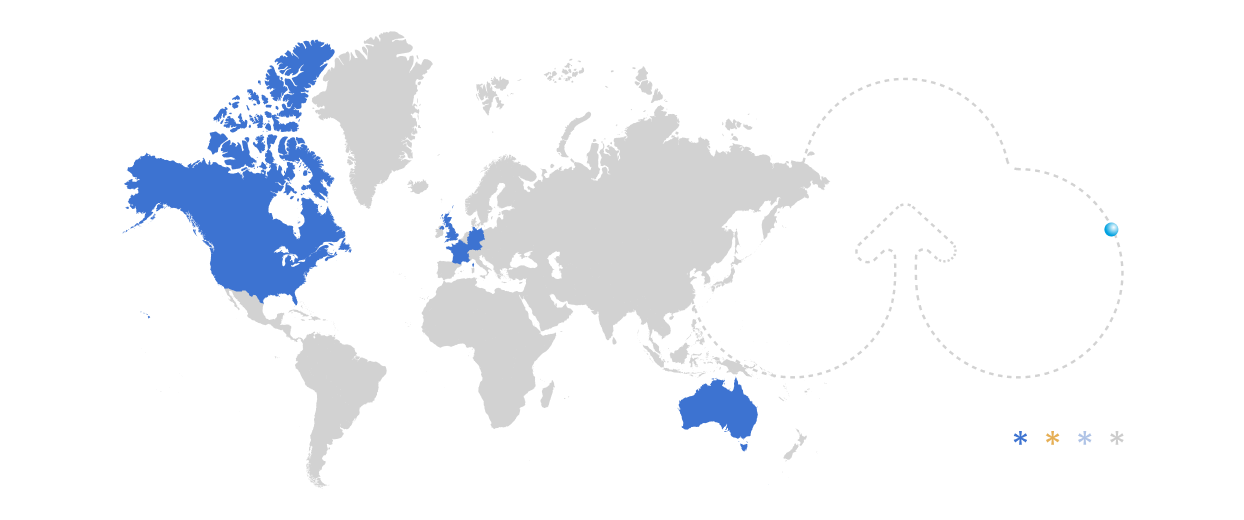
You choose, when you connect your org. CloudFiles offers four data-residency regions — the United States (default), the European Union, the United Kingdom and Australia — and the region you pick determines where your CloudFiles data lives. Your data does not leave the region you selected.
The service runs on Amazon Web Services, with MongoDB Atlas database clusters deployed on AWS, across multiple fault-independent availability zones inside your chosen region. Backups stay in that same region.
How is my data encrypted?
In transit, CloudFiles encrypts all communication with TLS 1.2 or higher, and TLS 1.3 where available. At rest, data is encrypted with AES-256. Backups are encrypted with AES-256 at rest, and held redundantly across multiple availability zones within your data-residency region.
CloudFiles never holds the encryption keys for your connected storage. Those stay with whoever administers it — you, if it’s your own Amazon S3 bucket or Azure Blob Storage container, or your storage provider, if it’s SharePoint, Google Drive, OneDrive, Dropbox or Box.
What happens when Document AI reads a file?
Document AI runs on Amazon Bedrock, an AWS service, inside the data-residency region you selected when you set up your account. Inference happens in that region, and the document does not leave it.
Two separate commitments sit behind that. Zero data retention: document content is not kept after a request completes. No model training: your documents are not used to train any model, and CloudFiles does not use them for any secondary purpose beyond operating the service under your agreement.
Document AI does read the contents of a file — that is how it extracts fields, classifies and summarises. CloudFiles would rather say so than imply the content is opaque to the service: a product that reads your documents cannot also claim it can never see them.
Who can access my documents?
On Salesforce, there is no separate CloudFiles login. CloudFiles runs inside your org, and the Salesforce session is the authentication — no CloudFiles login screen, no second password, no separate user directory to keep in step with your own. Whatever your org already enforces — single sign-on, your identity provider, your MFA policy — applies to CloudFiles the moment it applies to Salesforce, because it is the same session. There is no second identity surface to secure, audit, or decommission when someone leaves.
On HubSpot, CloudFiles has a web app with a login; MFA there is enforced through Google or Microsoft sign-in, so enforcement sits with your identity provider rather than with CloudFiles. API access on either CRM uses API keys as bearer tokens.
CloudFiles’ own personnel receive access on least privilege: unique credentials per person, approval before provisioning, and prompt removal on role change or termination, with access to the systems that process customer data logged and monitored. Security and privacy training is mandatory at onboarding and annually, and includes a HIPAA module and phishing simulations. These commitments are contractual, in Annex II of the DPA.
Which sub-processors does CloudFiles use?
CloudFiles’ sub-processors are named in Annex III of the Data Processing Agreement, which is public. The DPA is the single authoritative list — it is the version that binds CloudFiles contractually, and it states which sub-processors receive Customer Content.
If CloudFiles adds or replaces a sub-processor, you get thirty days’ written notice in advance and a right to object before the change takes effect. Sub-processors are contractually barred from using your data for any purpose other than supporting CloudFiles in delivering the service.
What stays in your control?
The custody model draws a clean line. CloudFiles is responsible for the service — its infrastructure, its sub-processors, its personnel, and the processing described on this page. You keep the controls you already own, and they keep working, because CloudFiles inherits them rather than replacing them:
- Your storage permissions. Files live in your storage, so the access rules it enforces keep applying — CloudFiles reflects them live rather than maintaining a parallel copy. For SharePoint automations, that scope can be narrowed further with a Service Principal restricted to specific sites.
- Your identity provider. Sign-in runs through Salesforce or through Google/Microsoft, so SSO and MFA are enforced where you already enforce them.
- Your CRM’s access model. Who sees a record — and therefore the documents surfaced on it — is decided by your Salesforce or HubSpot configuration.
- Your S3 or Azure Blob keys, if you bring your own bucket or container. The bucket or container, its policy and its encryption keys stay in your own cloud account.
What happens to your data, in writing.
The commitments behind those certifications, in plain terms — retention, agreements and HIPAA.
Retention and deletion
When your subscription ends, your data is available for export for thirty days. After that, CloudFiles deletes it.
- Deletion extends to copies held in backups, purged in the ordinary backup rotation cycle.
- CloudFiles will certify deletion in writing on request.
- Identifiable usage data is retained no longer than twenty-four months.
Agreements and transfers
CloudFiles' Data Processing Agreement is published in full, not held back for a request.
- Transfers outside the EEA rely on the Standard Contractual Clauses adopted under Implementing Decision (EU) 2021/914.
- Sub-processors are named in Annex III, with thirty days' notice and a right to object before any change.
- CloudFiles does not sell usage data to third parties.
HIPAA
CloudFiles signs HIPAA Business Associate Agreements for customers on enterprise agreements.
- Ask your account team to start one.
- HIPAA is a law rather than a certification scheme, so CloudFiles states compliance with it, not certification.
What's public, and what's under NDA.
CloudFiles publishes its claims here and its contract at cloudfiles.io/dpa. Certificates, audit reports and internal policies are requested through the trust portal at trust.cloudfiles.io — this table says which is which before you ask.
| Certifications and attestations | Status | Document | How to get it |
|---|---|---|---|
| SOC 2 Type II | Independently audited | SOC 2 Type II report | Under NDA — enterprise customers and qualified prospects |
| ISO 27001:2022 | Certified | ISO 27001:2022 certificate | Trust portal — access request |
| ISO 27017:2026 | Certified | ISO 27017:2026 certificate | Trust portal — access request |
| ISO 27018:2025 | Certified | ISO 27018:2025 certificate | Trust portal — access request |
| HIPAA | Compliant | Business Associate Agreement | Enterprise agreements — ask your account team |
| GDPR | Compliant | Data Processing Agreement | Public — https://www.cloudfiles.io/dpa |
| Security documentation | |||
| Encryption and key management | Documented | Encryption Policy | Under NDA — via the trust portal |
| Vulnerability scanning and penetration testingCloudFiles commissions penetration testing by independent third parties. | Documented | Vulnerability Assessment and Pentest Reports | Under NDA — summaries available |
| Availability, backup and recovery objectivesThe service runs across multiple fault-independent AWS availability zones within your data-residency region. | Documented | BC/DR, Backup Policy | Under NDA — via the trust portal |
| Logging and log retention | Documented | Logging, Data Access | Under NDA — via the trust portal |
| Personnel screening and training | Documented | Internal Assessments, ISMS Policy | Under NDA — via the trust portal |
Frequently asked security questions
CloudFiles is independently audited for SOC 2 Type II, certified to ISO 27001:2022, ISO 27017:2026 and ISO 27018:2025, and compliant with HIPAA and GDPR. Data is encrypted with TLS 1.2 or higher in transit and AES-256 at rest, and stored in one of four data-residency regions you choose. Certificates and reports are available at https://trust.cloudfiles.io/
CloudFiles is independently audited for SOC 2 Type II. SOC 2 produces an audit report rather than a certificate, which is why CloudFiles says audited rather than certified. The report is available under NDA to enterprise customers and qualified prospects — request it through the trust portal at https://trust.cloudfiles.io/ or ask your account team.
Yes. CloudFiles is certified to ISO 27001:2022, and also to ISO 27017:2026 and ISO 27018:2025, the cloud-specific standards in the same family. Certificates are available through the trust portal at https://trust.cloudfiles.io/
Yes to both. CloudFiles is HIPAA compliant, and signs HIPAA Business Associate Agreements for customers on enterprise agreements — ask your account team to start one. HIPAA is a law rather than a certification scheme, so CloudFiles states compliance with it, not certification.
Yes. CloudFiles is GDPR compliant, and its Data Processing Agreement is published in full at https://www.cloudfiles.io/dpa rather than held back for a request. Transfers outside the EEA rely on the Standard Contractual Clauses adopted under Implementing Decision (EU) 2021/914, set out in Schedule 1 of that DPA.
In the data-residency region you select when you connect your org: the United States (default), the European Union, the United Kingdom or Australia. CloudFiles runs on Amazon Web Services with MongoDB Atlas database clusters deployed on AWS, and your data does not leave the region you chose. Backups stay in that region too.
No. CloudFiles does not use your documents to train any model, and does not use them for any secondary purpose beyond operating the service under your agreement. Document AI runs with zero data retention, so document content is not kept once a request completes.
Amazon Bedrock, an AWS service. CloudFiles sends document content to Bedrock for extraction, classification and summarisation, inside the data-residency region you selected, with zero data retention. AWS is named as a sub-processor in Annex III of the CloudFiles Data Processing Agreement at https://www.cloudfiles.io/dpa
CloudFiles' sub-processors are named in Annex III of its Data Processing Agreement at https://www.cloudfiles.io/dpa — the public, single authoritative list, which also states which sub-processors receive Customer Content. CloudFiles gives thirty days' advance written notice of any addition or replacement, with a right to object before the change takes effect.
On Salesforce, no — CloudFiles runs inside your org and the Salesforce session is the authentication, so your own single sign-on, identity provider and MFA policy apply, with no second set of credentials to manage. On HubSpot, CloudFiles has a web app whose MFA is enforced through Google or Microsoft sign-in.
Yes. For automations, connect CloudFiles with a Service Principal — an application-only identity in your Microsoft Entra directory, with no signed-in user or licensed seat behind it — and scope it to specific sites using Microsoft's Sites.Selected permission. CloudFiles then reaches only the sites you've explicitly granted, nothing tenant-wide. For interactive use, each person connects their own SharePoint account instead, so access never exceeds what they already have. Setup guide: https://help.cloudfiles.io/salesforce/restrict-cloudfiles-access-to-specific-sharepoint-sites
CloudFiles maintains defined breach procedures and, acting as processor, notifies affected customers without undue delay once it becomes aware of a personal data breach. The notification describes the nature of the breach and gives a contact point for further information, as required by Clause 8.6(c) of the Standard Contractual Clauses in the CloudFiles DPA at https://www.cloudfiles.io/dpa
CloudFiles applies Secure Software Development Lifecycle standards across the product lifecycle, runs internal security reviews before new services deploy, builds threat models for new services, and monitors for changes to critical infrastructure that bypass change management. The CloudFiles Salesforce package is also security-reviewed by Salesforce as a condition of its AppExchange listing.
Email security@cloudfiles.io. CloudFiles' Product Security Team responds within two business days, and CloudFiles will not pursue legal action against anyone who reports a vulnerability in good faith through that inbox. The full policy, including scope, is at https://www.cloudfiles.io/responsible-disclosure
Your data is available for export for thirty days after your subscription ends, and CloudFiles deletes it after that. Deletion extends to copies held in backups, purged in the ordinary backup rotation cycle, and CloudFiles will certify deletion in writing on request. Identifiable usage data is retained no longer than twenty-four months.
Running a security review?
Email security@cloudfiles.io for vulnerability reports. Certificates, audit reports and policies are requested through the trust portal; the contract is public; live service status is at https://status.cloudfiles.io/.
Last updated