CloudFiles' SharePoint integration with Salesforce has reduced data storage costs, simplified document management, and enhanced efficiency. Outstanding support. Highly recommend for reducing storage expenses.
Latha DavuluriW. R. Grace & Co.

Your team switches between Salesforce and SharePoint dozens of times a day. CloudFiles ends that with real-time sync, AI document intelligence, branded sharing with analytics, and the only AppExchange integration compliant with HIPAA and GDPR and independently audited for SOC 2 Type II and certified to ISO 27001.



















Real data from 2,000+ teams using CloudFiles for Salesforce SharePoint integration.
Salesforce files synced to SharePoint every month
Average reduction in Salesforce storage costs with CloudFiles
Rating on Salesforce AppExchange (AgentExchange)
Average time from install to live Salesforce SharePoint sync
Annual renewal rate — teams don't leave
Middleware, custom code or IT tickets needed for SharePoint
Salesforce SharePoint integration connects your Salesforce org to Microsoft SharePoint Online so every file is stored in SharePoint and accessible inside any Salesforce record — no tab switching, no lost documents, no extra storage costs.
Files uploaded in Salesforce appear in SharePoint instantly and vice versa. No manual transfers, no stale copies, no delays.
CloudFiles creates SharePoint folders mirroring your Salesforce records — Accounts, Opportunities, Cases or any custom object.
Move all existing Salesforce files to SharePoint in one operation. Users see no disruption and files stay accessible inside Salesforce after migration.
CloudFiles reads any SharePoint file — PDFs, scans, images — and auto-extracts structured data into Salesforce fields. No model training required.
Independently audited for SOC 2 Type II, certified to ISO 27001, and compliant with HIPAA and GDPR — the only Salesforce SharePoint integration with this full compliance stack.
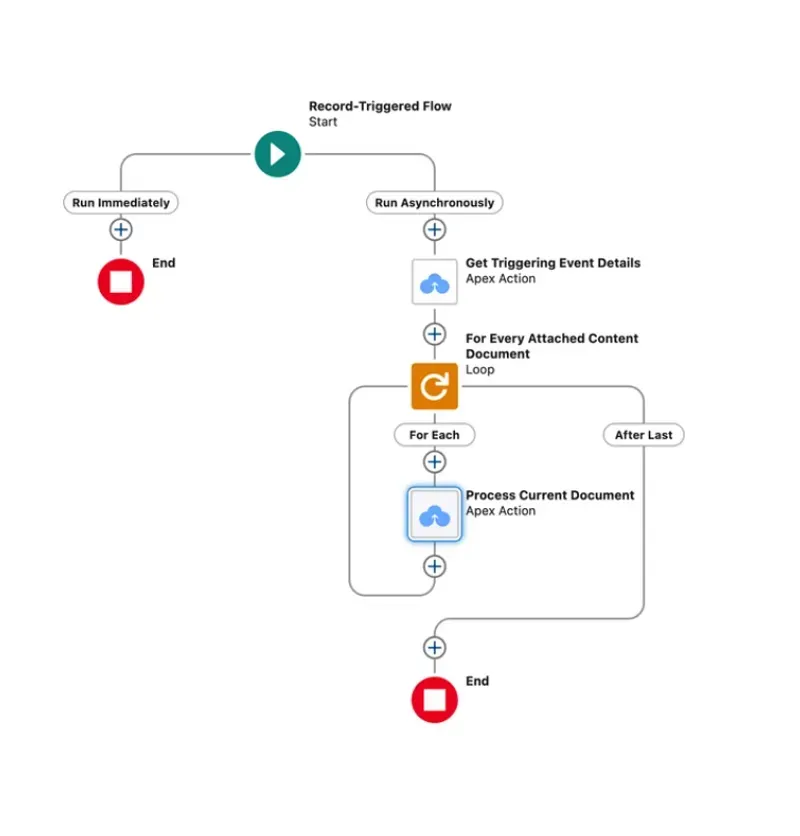
Point-and-click setup for admins. Developers get Apex methods, 50+ Flow actions and a REST API for advanced automation.
From Salesforce admins to the C-suite, here's why 2,000+ teams made the switch.
Salesforce charges $5 per GB per month. SharePoint costs a fraction of that. CloudFiles moves files automatically, cutting storage spend by up to 75%.
Reps lose hours every week toggling between Salesforce and SharePoint. CloudFiles surfaces every file inside the Salesforce record where work already happens.
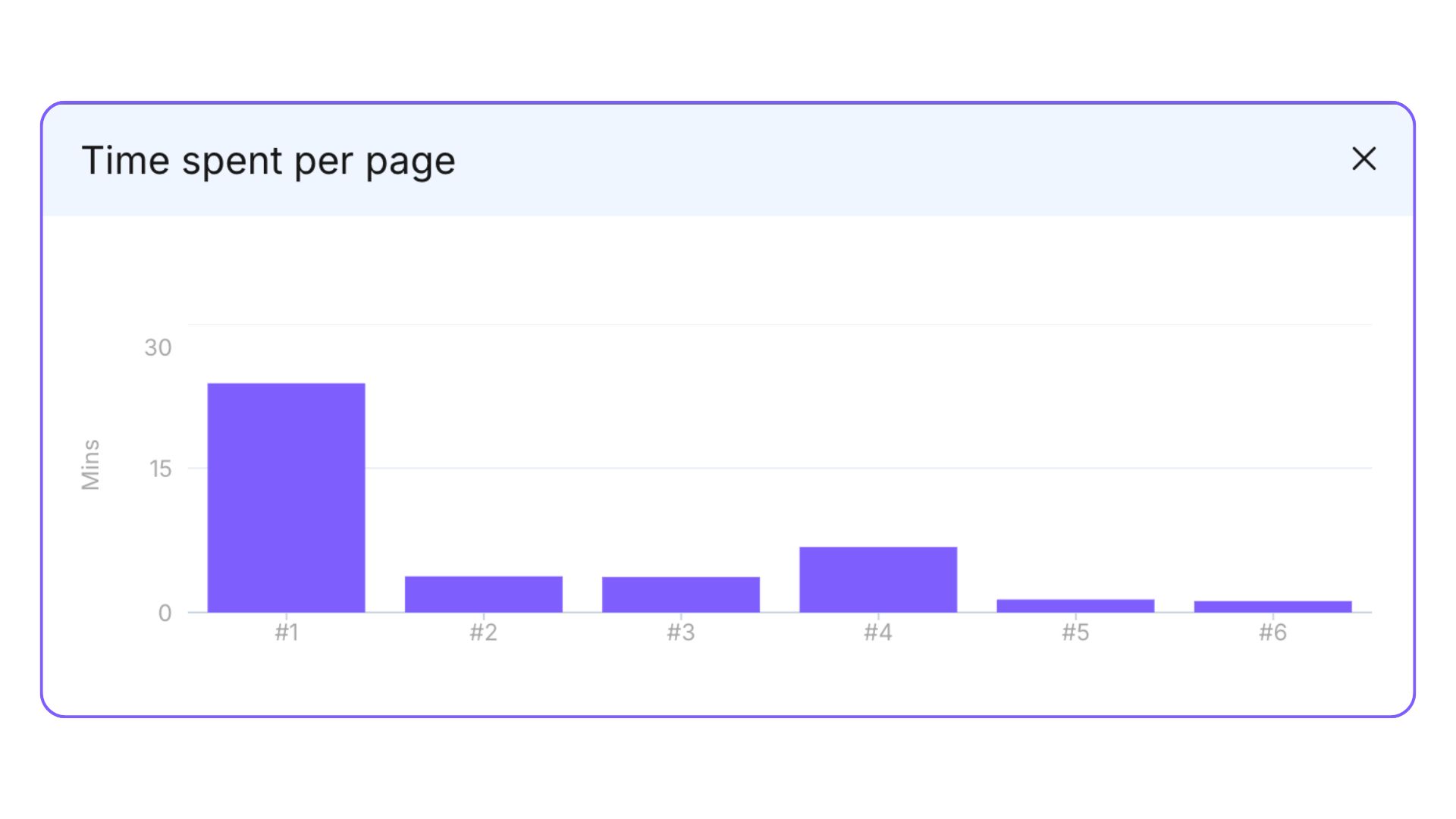
Send a proposal and know exactly when it was opened, which pages were read, for how long, and on which device. No guessing, ever.
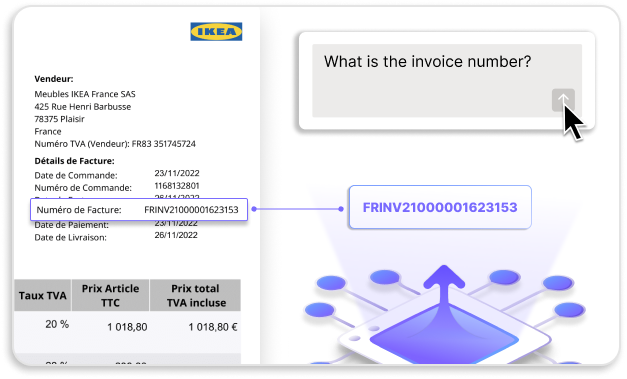
Contracts, invoices and forms contain structured data. CloudFiles AI extracts it, populates Salesforce fields and triggers flows automatically.
CloudFiles reads any SharePoint file and pulls structured data directly into Salesforce fields. No re-typing, no errors, no wasted hours.
Install from AppExchange, connect SharePoint via OAuth, configure your mappings and sync. No custom code, no IT ticket, no delays.
Join 2,000+ teams who've already solved these problems with CloudFiles.
No separate app to log into. No custom code. Most teams go live in under 30 minutes.
Search for CloudFiles Document Management in the Salesforce AppExchange and install into your org. Admin access required.
Authorise your Microsoft 365 SharePoint Online account via OAuth. Each user authenticates with their own credentials.
Define which Salesforce objects map to which SharePoint folder paths. Set folder naming using Salesforce field values.

Files sync automatically. Run the bulk migration utility to move existing Salesforce files to SharePoint — zero disruption.

The only Salesforce SharePoint connector with file-sharing intelligence, AI document processing, and developer-grade automation.
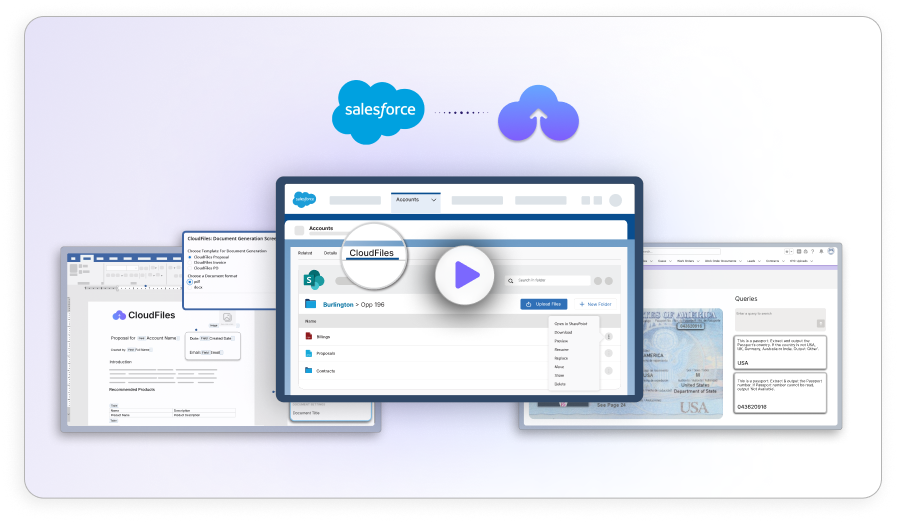
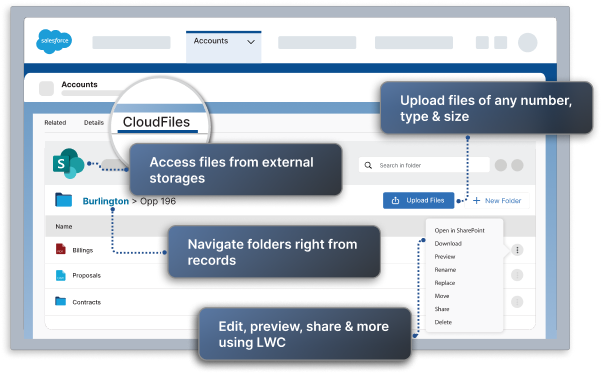
Browse, upload, preview and organise SharePoint folders without leaving the Salesforce record. Works on any standard or custom object and the Salesforce mobile app.
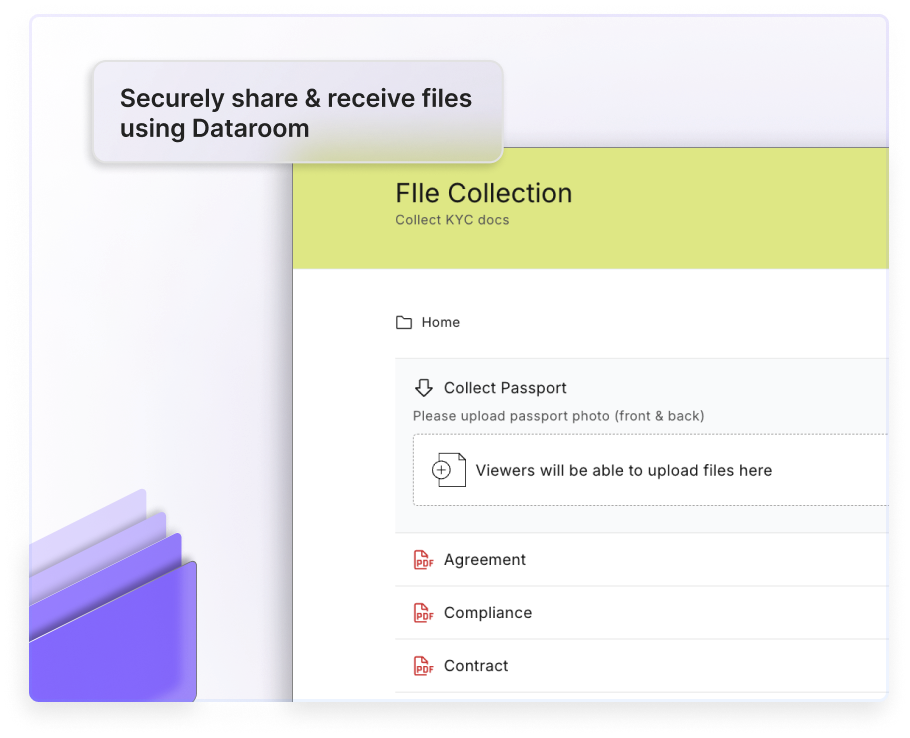
Send any SharePoint file as a branded link with full access controls. Modify settings after sending. Revoke access anytime from Salesforce.
See not just who opened a file but how long they spent on each page, on which device, and from which location — for every shared document.
CloudFiles Document AI reads any SharePoint file — PDFs, scanned documents, images — and extracts structured data that fills Salesforce fields and triggers workflows automatically.
CloudFiles exposes your Salesforce SharePoint integration as modular building blocks — drag-and-drop Flow actions, platform events, custom objects and a full developer API.
Don't waste weeks guessing. In 30 minutes, we'll audit your workflow, identify automation gaps, and build your roadmap.
Verified 5★ reviews on Salesforce AppExchange from real customers.
CloudFiles' SharePoint integration with Salesforce has reduced data storage costs, simplified document management, and enhanced efficiency. Outstanding support. Highly recommend for reducing storage expenses.
CloudFiles' SharePoint/Salesforce integration is excellent. The team is collaborative, responsive, and highly knowledgeable. They go the extra mile to meet our needs. Highly recommend.
CloudFiles is incredibly robust and handles our document processes flawlessly. The highly responsive team are true problem solvers. Worth every dollar. Absolutely recommend for Salesforce.
CloudFiles is an excellent, easy-to-use app. It quickly solved our Salesforce to SharePoint file transfer crisis with seamless implementation and outstanding customer support. Highly recommend!
Using CloudFiles' SharePoint integration with Salesforce has saved us on data storage costs. Their support and flow templates for file permissions are excellent. Highly recommended!
CloudFiles seamlessly integrates OneDrive with Salesforce, offers flexible Apex actions, and provides outstanding support. Vishesh and team ensured a smooth setup and file migration.
CloudFiles is an excellent tool for centralized document storage. Easy to set up, with responsive support throughout the process. Highly recommended
Excellent app! Setup is straightforward and their support team is outstanding. They consistently go above and beyond. We're very happy with CloudFiles.
Fantastic app and high-level support! CloudFiles makes managing and organizing files in Salesforce super easy with seamless SharePoint integration.
CloudFiles is independently audited for SOC 2 Type II, certified to ISO 27001, and compliant with HIPAA and GDPR. Data residency is supported in the US, EU, UK, and AU. Your files stay in your own storage — CloudFiles never re-hosts them — and are not used to train our AI models.



Products that do everything with your documents in Salesforce.

Effortlessly organize and manage external docs from SharePoint, Google Drive, AWS S3 and more in Salesforce. Share with Experience Cloud or external users.

Use AI-powered OCR to reduce data entry by extracting, classifying, and verifying your docs in seconds. Harness the power of AI for your documents.

Instantly generate on-brand documents by merging fields from Salesforce into customizable templates. Boost productivity like never before.
Explore helpful resources.
Setup options, Files Connect limitations, migration strategies, and choosing the right integration approach.
Setup options, Files Connect limitations, migration strategies, and choosing the right integration approach.
See how CloudFiles transforms file management inside Salesforce. On-demand.
Step-by-step guide — installation, permissions and go-live in 30 minutes.
Both tools connect Salesforce to SharePoint. The depth of that connection is where they differ significantly.
Integrating Salesforce with Microsoft SharePoint gives your team a single place to manage customer data and documents without leaving Salesforce. The key benefits: significantly lower storage costs (SharePoint offers far more storage capacity than Salesforce at a fraction of the cost), real-time file access inside every Salesforce record, automated folder structures per Account, Opportunity or Case, enterprise-grade compliance backed by independent SOC 2 Type II auditing, ISO 27001 certification, and HIPAA compliance, and AI-powered document processing that auto-extracts data from files into Salesforce fields.
You can integrate Salesforce with Microsoft SharePoint using a no-code AppExchange app like CloudFiles. Install it from AppExchange, connect your SharePoint Online account via OAuth, configure which Salesforce objects map to which SharePoint folders, and go live in under 30 minutes — no custom code or middleware required.
Salesforce does not provide a native, out-of-the-box integration with Microsoft SharePoint. It offers a basic feature called Files Connect that allows read-only access, but it lacks 2-way sync, folder automation, analytics, AI processing and bulk migration. Most organisations use a dedicated AppExchange app like CloudFiles to get a full, enterprise-grade integration.
CloudFiles adds real-time 2-way sync, automated folder creation per record, branded secure file sharing with engagement analytics, AI OCR document extraction, bulk file migration, Experience Cloud portal support, Salesforce Flow and Apex API access, document generation, and independent SOC 2 Type II auditing, ISO 27001 certification, and HIPAA compliance. Files Connect provides read-only SharePoint access only — none of these capabilities are included.
No. Files are stored entirely in SharePoint, not in Salesforce. CloudFiles only stores metadata (file references and activity logs) in Salesforce custom objects, which consume negligible storage. Customers typically reduce Salesforce storage costs by up to 75%.
Costs vary by method. Custom API-based integrations typically cost $10,000 to $100,000+ in development. No-code AppExchange apps like CloudFiles are priced per Salesforce user per month, significantly lower, and often pay for themselves within the first month by reducing Salesforce storage costs by up to 75%.
Yes. CloudFiles includes a bulk migration utility that moves all existing Salesforce files, attachments and ContentDocuments to SharePoint in one operation — organised automatically into folders that mirror your Salesforce record hierarchy. Users see zero disruption: every file remains accessible inside Salesforce after migration, and Salesforce storage is freed up immediately.
Yes. No-code AppExchange solutions like CloudFiles let you automatically store Salesforce files in Microsoft SharePoint without writing a single line of code. CloudFiles creates SharePoint folder structures that mirror your Salesforce record hierarchy, syncs files in real time, and makes SharePoint documents accessible directly inside Salesforce — all configured through a point-and-click admin interface. Developers who want more control also get Apex methods, Flow actions, and a REST API.
We use cookies to run this site, understand how it is used, and measure our marketing. You choose what we may use. Read our Cookie Policy.
Choose which categories we may use. You can change this any time from “Cookie preferences” in the footer.
Required for the site to work — page delivery, security and bot protection on our forms (Cloudflare Turnstile), and remembering this cookie choice. These never store marketing identifiers and cannot be switched off.
Helps us understand which pages are useful, so we can improve them. Google Analytics 4 and Google Tag Manager (Google Ireland Ltd).
Powers our live chat so you can talk to us and we can keep your conversation history. Gist (Gist Applications Inc). You can always start a chat without this — we load it only when you click.
Lets us measure our advertising and reach people who have shown interest in CloudFiles. LinkedIn Insight Tag (LinkedIn Ireland), Google Ads (Google Ireland Ltd), and — outside the EEA/UK — ZoomInfo WebSights (ZoomInfo Technologies LLC).