

Sales teams close deals in Sales Cloud. Documents like contracts, proposals, product specs, and pricing sheets live in SharePoint or Box. The disconnect between these systems costs real selling time. Sales reps spend an average of 20–30% of their working week on administrative tasks, including document management, and time spent finding, moving, and filing documents is the most avoidable portion of that burden.
CloudFiles on AppExchange integrates SharePoint and Box with every Sales Cloud object, provides automated folder creation per record, bidirectional sync, branded sharing analytics, and Document AI.
How Does CloudFiles Support Every Sales Cloud Object?
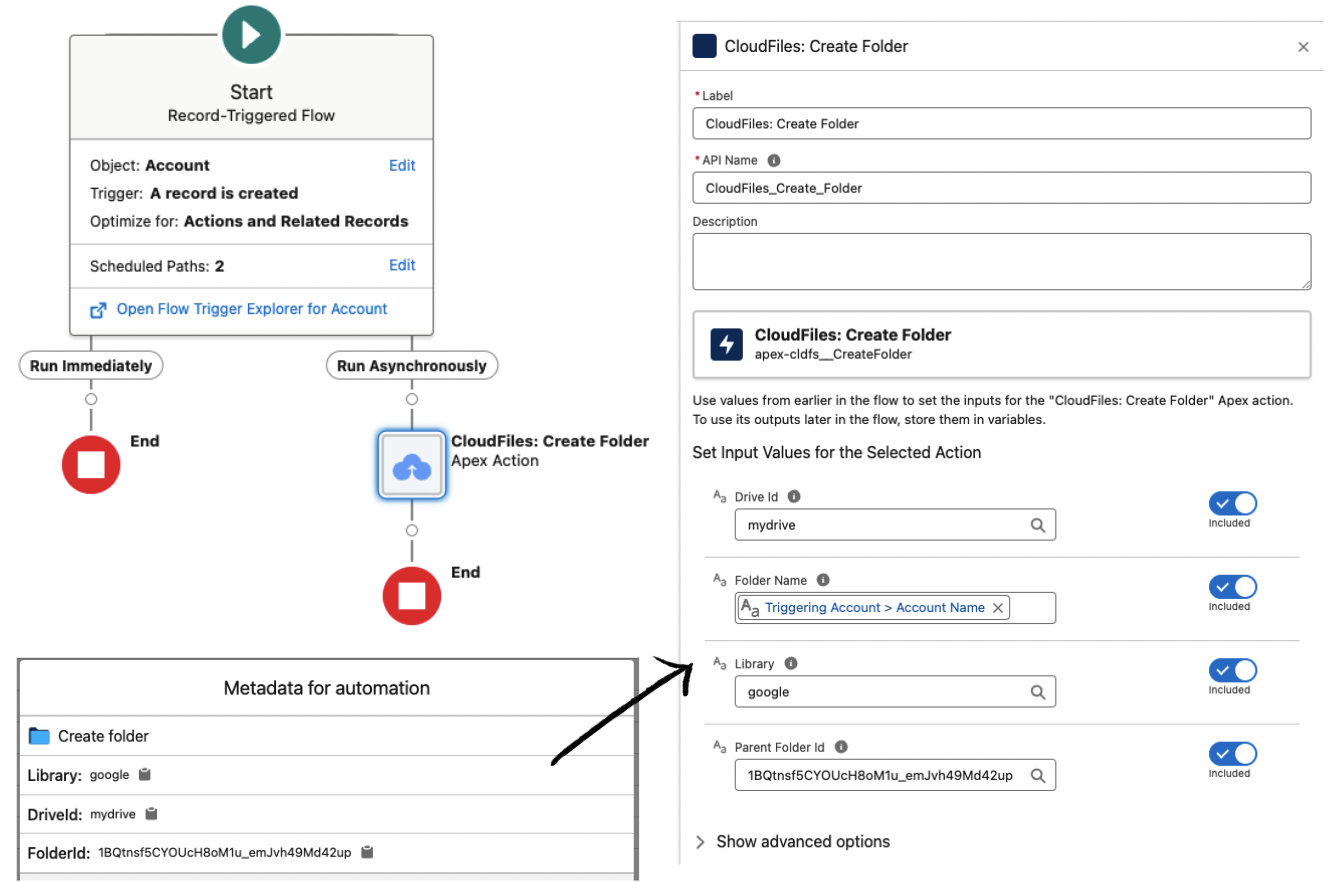
- Accounts — Company folders are auto-created in SharePoint or Box when the Account is saved. All account documents accessible on the Account record page. Teams automating Account folder creation report, eliminating 8–12 hours per week of manual folder management for teams managing 500+ Accounts.
- Opportunities — Deal folders are auto-created when Opportunities are opened. Files sync throughout the deal lifecycle. Reps never leave Salesforce to manage deal documents. Organisations with integrated CRM and document systems close deals 18% faster (Gartner, 2026).
- Contacts — Individual document folders for key stakeholders, accessible from Contact records.
- Leads — Document storage from the first interaction, before conversion.
All objects use the same setup: Record-Triggered Flow + CloudFiles Create Folder action. Most admins configure this in under 10–30 minutes. Quick start →
SharePoint for Sales Cloud
For Microsoft 365 teams, CloudFiles connects to SharePoint via OAuth individual user credentials and existing SharePoint permissions. Files uploaded to Opportunities land in SharePoint immediately. 900,000+ files sync through CloudFiles monthly across 2,000+ teams. SharePoint setup →
Box for Sales Cloud
For Box orgs, CloudFiles connects using the same architecture and interface as SharePoint, which is the same LWC, same Flow actions, same compliance posture.
How Does Document Engagement Data Improve Sales Intelligence?
When a rep sends a proposal, knowing if the prospect opened it and which page they spent the most time on changes the follow-up strategy. Teams using CloudFiles sharing analytics report 10x more document visibility than standard SharePoint sharing. All engagement data is written to the Opportunity record and can trigger Flow automations.
Compare CloudFiles vs Share Connect →
Frequently Asked Questions
- Can SharePoint be integrated with Salesforce Sales Cloud?
Yes. CloudFiles integrates SharePoint with all Sales Cloud objects (Account, Opportunity, Contact, Lead) and any custom objects, with automated folder creation, bidirectional sync, branded sharing, and Document AI. - Can Box be integrated with Salesforce Sales Cloud?
Yes. CloudFiles supports Box as a storage backend for Sales Cloud with the same LWC interface, Flow actions, and compliance posture as SharePoint. All storage integrations → - Does CloudFiles automatically create SharePoint or Box folders for Sales Cloud Opportunities?
Yes. A Record Triggered Flow using the CloudFiles Create Folder action creates a folder for each new Opportunity. Named from field values, optionally nested inside the Account folder, linked to the record automatically. - Can sales reps access SharePoint or Box files from inside Sales Cloud without switching apps?
Yes. The CloudFiles LWC embeds a file manager into every Sales Cloud record page. Upload, preview, share, and organize documents without leaving the CRM. - Do file sharing links from Sales Cloud work without a Microsoft or Box account?
Yes. CloudFiles sharing links do not require recipients to have a Microsoft or Box account. Clients and prospects can open documents directly through a branded link. - Can document engagement analytics from SharePoint or Box be seen in Sales Cloud?
Yes. CloudFiles records page level engagement. Who opened a file, time per page, download events. As Salesforce custom objects on the linked Sales Cloud record. Available in reports, dashboards, and Flow triggers. - Does using CloudFiles affect the way Sales Cloud data is structured?
No. CloudFiles adds LWC components to existing page layouts and creates separate custom objects for metadata and analytics. It does not modify existing Salesforce objects or standard Sales Cloud configuration. - Can different Sales Cloud objects use different storage (SharePoint for some, Box for others)?
Yes. CloudFiles can route different Sales Cloud objects or record types to different storage backends. - Is CloudFiles compliant for regulated sales documents (contracts, financial records)?
Yes. CloudFiles is independently audited for SOC 2 Type II, certified to ISO 27001, and compliant with HIPAA and GDPR. Files remain in your SharePoint or Box tenant. Compliance details → - How quickly can Sales Cloud be integrated with SharePoint or Box via CloudFiles?
Most Sales Cloud integrations are live in under 30 minutes. Install, authenticate, configure folder templates, add LWC to layouts, activate Flows. Free setup support available at meet.cloudfiles.io/salesforce. - Why do Sales Cloud teams choose CloudFiles over native file sharing tools?
Sales Cloud teams use CloudFiles because: - Native Salesforce Files stores documents at $5/GB/month. SharePoint and Box are included in existing subscriptions.
- Files Connect provides read only access with no upload, sync, or analytics.
- CloudFiles delivers 10x more sharing visibility than standard SharePoint or Box links.
- Automated folder creation eliminates 8–12 hours/week of manual document setup.
- Document AI reduces manual data entry by up to 80% for deal documents.