

Standard SharePoint sharing gives recipients a link and you get nothing back. No view notification. No page-level analytics. No expiry. No domain restrictions. And if the recipient doesn't have a Microsoft account, they may not be able to open the file at all. 55% of external file sharing requests fail or require extra steps when recipients lack Microsoft accounts, thereby creating friction at the worst possible moment in a sales or service interaction.
CloudFiles on AppExchange integrates SharePoint with Salesforce and adds enterprise-grade secure sharing on top, which provides branded links, granular access controls, page-level engagement analytics, and all activity written back to Salesforce automatically.
How Does CloudFiles Help Close Document Sharing Security Gaps?
From within Salesforce, reps configure every link before it goes out:
- Branded domain — your company URL, not a Microsoft link
- Password protection — recipients enter a password you set
- Email allowlist — only specific addresses or domains can open the file
- Expiry date — link stops working after a date you choose
- Download control — allow or block file downloads
- Datarooms — bundle multiple SharePoint files into one branded link
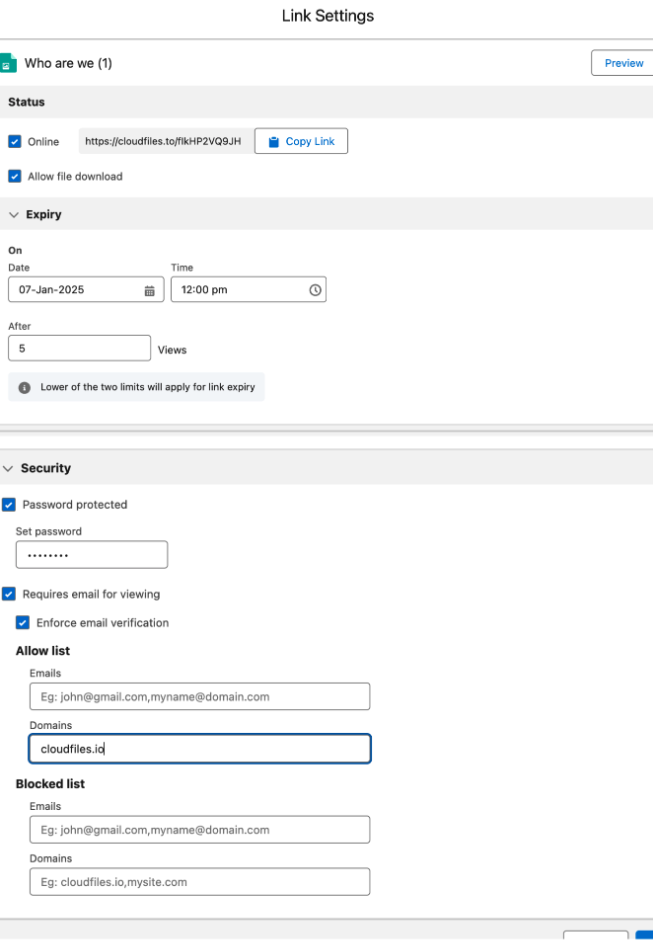
All settings can be modified or revoked after the link is sent, from inside Salesforce, with no SharePoint admin involvement.
How Can Engagement Analytics Improve Sales Performance?
Teams using CloudFiles sharing analytics report 10x more document visibility than standard SharePoint sharing links. After a link is sent, Salesforce records:
- Time spent on each page per viewer
- Unique viewer count and download events
- Device, browser, and geographic data
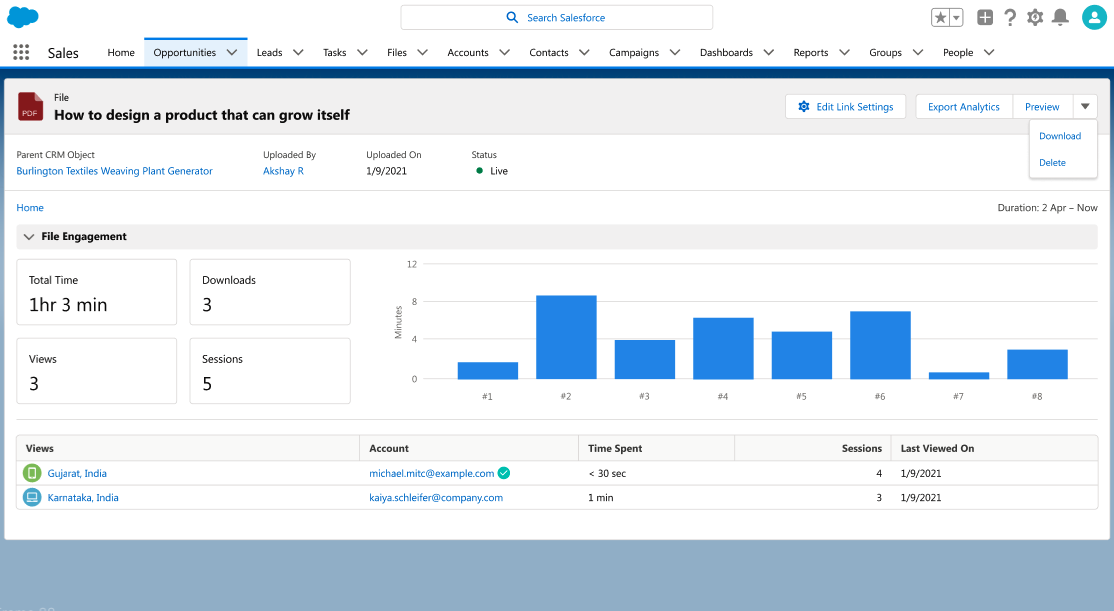
This data lives as Salesforce custom objects, usable in reports, dashboards, and Flows. Set a Flow to notify the account owner when a proposal is opened. Flag a deal when a contract is viewed five times without being signed. Organisations using engagement-triggered automations report 18% faster deal progression (Gartner, 2026).
Do Recipients Need a Microsoft Account to Access Shared Files?
CloudFiles links work for any recipient, be it customers, partners, or prospects, with no Microsoft sign-in required. Access is controlled by the settings you configure (password, allowlist, expiry), not by identity requirements. Unlike standard SharePoint sharing, there's no barrier to entry for non- Microsoft users.
Full compliance certifications →
Frequently Asked Questions
- Can SharePoint files be shared securely with external users from Salesforce?
Yes. CloudFiles allows Salesforce users to generate branded, secure sharing links for any SharePoint file directly from the Salesforce record. With password protection, email allowlists, expiry dates, and download controls. No Microsoft account required for recipients. - What security controls does CloudFiles apply to shared SharePoint files?
CloudFiles supports the following access controls per sharing link: - Password protection (custom password per link)
- Email allowlist (restrict to specific addresses)
- Domain allowlist (restrict to specific email domains)
- Link expiry date
- Download enable/disable
- View only vs. download permissions
- Revoke access at any time after sending
- Do external recipients need a Microsoft account to access shared SharePoint files?
No. CloudFiles sharing links provide access to SharePoint files without requiring recipients to authenticate with a Microsoft account. Access is controlled through CloudFiles' own link security settings. - Can CloudFiles track who opens a shared SharePoint file?
Yes. CloudFiles records viewer identity (if email capture is enabled), unique view count, total views, download count, time of access, device type, browser, and geographic location for every shared link. - Does CloudFiles provide page level analytics for shared documents?
Yes. For PDFs and slide decks, CloudFiles tracks time spent on each individual page per viewing session. Showing exactly which sections received the most attention. - Are file sharing analytics stored in Salesforce?
Yes. All engagement data is written back to Salesforce as custom objects. Usable in reports, dashboards, and as Flow triggers (e.g., notify account owner when a proposal is opened, flag deal when a contract is viewed without being signed). - Can sharing link settings be modified after the link is sent?
Yes. Password, expiry date, allowlist, and download permissions can be modified at any time from the Salesforce record. Even after the link has been sent and used. - What is a CloudFiles Dataroom?
A Dataroom is a CloudFiles feature that bundles multiple SharePoint files into a single branded, secure link. Presenting them in a consolidated view. Useful for deal packages, onboarding kits, or compliance document sets. - Is secure SharePoint file sharing via CloudFiles HIPAA compliant and SOC 2 audited?
Yes. CloudFiles is independently audited for SOC 2 Type II, certified to ISO 27001, and compliant with HIPAA and GDPR. All sharing operations are logged for audit purposes. Files remain in your SharePoint tenant throughout. Review certifications → - How does CloudFiles compare to standard SharePoint external sharing?
Standard SharePoint sharing provides a link with no analytics, limited access controls, and requires a Microsoft account for many sharing scenarios. CloudFiles adds: - Branded links on your domain
- Password protection and email allowlists
- Page level engagement analytics in Salesforce
- Revoke access at any time
- No Microsoft account requirement for recipients
- 10x more document visibility than standard sharing
- Can CloudFiles sharing be used for Experience Cloud (community) portals?
Yes. CloudFiles is available for Salesforce Experience Cloud, enabling external portal users to share and receive SharePoint files with full security controls. - Why do sales teams use CloudFiles for secure file sharing?
Sales teams use CloudFiles secure sharing to: - Know the moment a prospect opens a proposal
- Track which pages of a contract a client reads
- Automatically follow up based on document engagement
- Prevent unauthorized file forwarding or re sharing
- Present a professional branded link instead of a Microsoft URL
- Eliminate the need for prospects to have Microsoft accounts