
Storage integrations for HubSpot
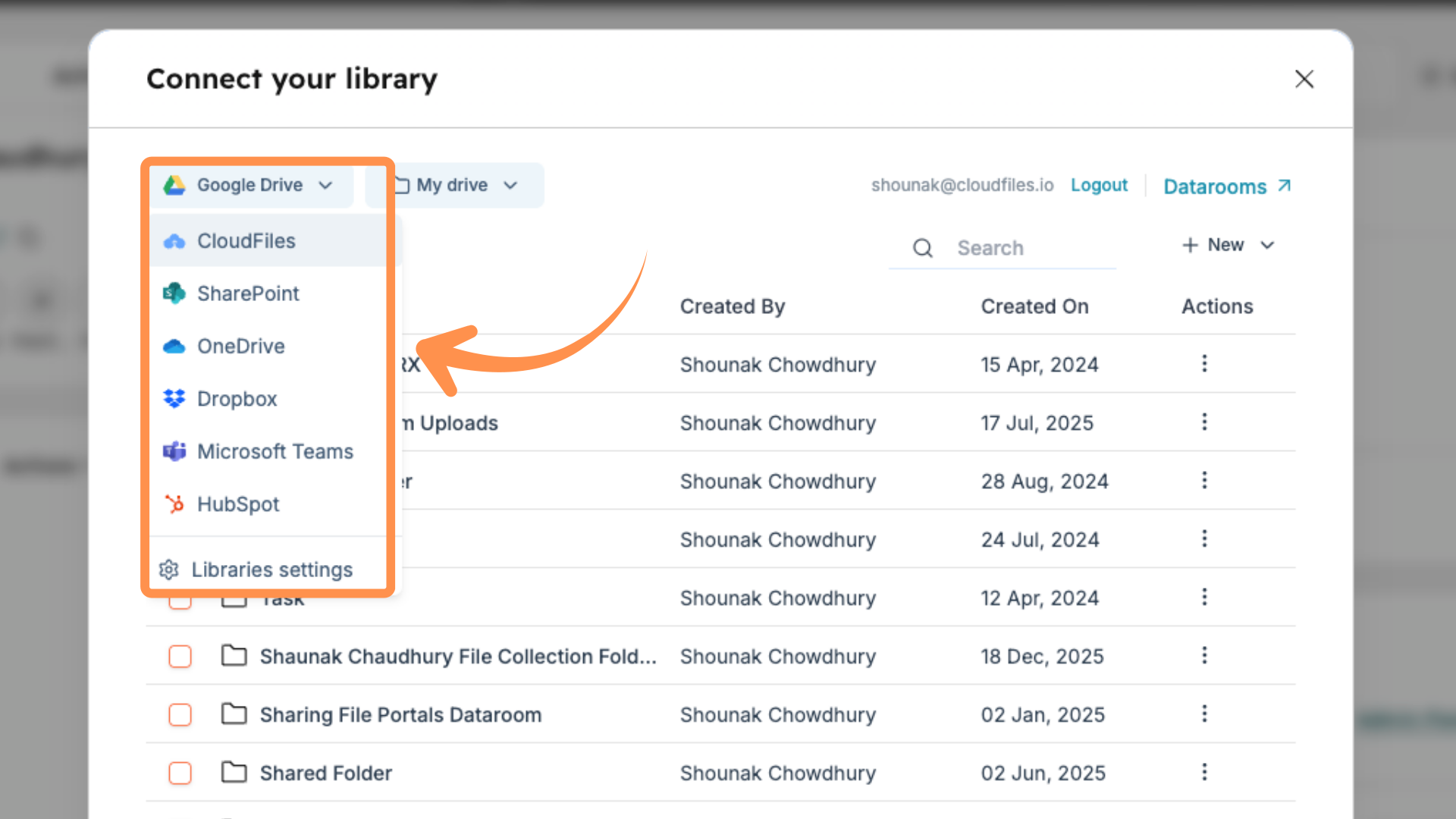
CloudFiles connects Google Drive, SharePoint, AWS S3, and more directly to HubSpot, so you can access live folders, preview files, and stay in sync without leaving your CRM.







Storage integrations, by the numbers
Real results from teams connecting cloud storage to HubSpot.
The control center for cloud content
CloudFiles unifies your entire storage stack by connecting every major cloud provider inside HubSpot.
Google Drive
CloudFiles syncs Google Drive with HubSpot for structured automation and smarter sharing.
- Access and manage Drive folders directly from HubSpot records
- Automate folder creation via form submissions or workflow triggers
- Share securely with password, expiry, and restricted access
SharePoint
CloudFiles embeds SharePoint libraries inside HubSpot to automate and manage files in real time.
- Browse and manage SharePoint folders from any HubSpot record
- Update SharePoint metadata (columns or filenames) automatically via workflow actions
- Track views, downloads, time spent, and sessions with full analytics
OneDrive
CloudFiles works with OneDrive files inside HubSpot as if they were native storage.
- Connect and navigate OneDrive folders from HubSpot deals, contacts, or tickets
- Preview, rename, move, or unlink files without leaving HubSpot
- Share files and track basic engagement, including views and downloads
CloudFiles native storage
CloudFiles' built-in storage gives full control, analytics, and automation with no third-party dependency.
- Store, organize, and share files natively from HubSpot
- Create branded, secure file portals for consolidated sharing
- Secure links with download control, expiry, passwords, and domain or email restrictions
Other storages
Beyond the core platforms, CloudFiles also connects with these storage options.
- Box and Dropbox: browse, share, and automate from within HubSpot
- HubSpot Storage: adds advanced sharing and analytics to native files
- AWS S3 and Azure Blob: link custom cloud buckets for secure file workflows
Used across industries
CloudFiles' document management streamlines marketing and sales workflows, boosting efficiency while saving time and money.
Financial services
Auto-organize client and compliance documents into structured cloud folders, linked to HubSpot records for easy access and audits.
Technology & IT
Manage project, onboarding, and client files by organizing them in external storage and linking them to deals and tickets.
Manufacturing
Structure supplier, QA, and compliance documents in cloud folders connected to vendor records or production tickets.
Getting started
Installation guide
A 2-minute guide to setting up and getting started with the CloudFiles HubSpot integration.
Quick starts
A list of help articles to help you quickly get started with common use cases.
Tutorials
Detailed articles on various use cases that show how industry leaders use CloudFiles.
Explore Storage Integrations with HubSpot
Learn how to connect and manage your cloud storage directly inside HubSpot.
Loved by Teams. Backed by Results.
But don’t just take it from us.
CloudFiles was live in our HubSpot workflows instantly. Easy to use, solved all file-sharing issues, and the personalized support made onboarding effortless. Highly recommend!
Best HubSpot-SharePoint integration! CloudFiles automates file management seamlessly. Super responsive team, fast bug fixes, and smooth workflow automation. Tried others—this is by far the best!
CloudFiles revolutionized our file sharing with partners and investors! Eliminated access issues, seamless integration with HubSpot, and powerful engagement analytics.
Best document tool for HubSpot! Easy to use, great analytics, and password-protected sharing. CloudFiles simplifies document management and tracking effortlessly.
CloudFiles delivers precise file tracking! HubSpot integration helps us capture views, and the insights we get are invaluable for understanding audience engagement.
CloudFiles is perfect for sales! Finally, a document control tool that works flawlessly in HubSpot. The ability to turn off downloads is a game-changer!
Essential for recruiters! CloudFiles transforms CV sharing in HubSpot with trackable links instead of attachments, making client interactions seamless and efficient. A game-changer for recruitment!
CloudFiles makes content gating seamless! Easy-to-use multiple URLs for tracking, deep HubSpot integration, and a super responsive support team make it a must-have tool!
CloudFiles is the best document tool for HubSpot! It’s intuitive, provides deep viewing analytics, and outperforms HubSpot's native file tools with precise tracking.
Stay compliant & secure.
CloudFiles is independently audited for SOC 2 Type II, certified to ISO 27001, and compliant with HIPAA and GDPR. Data residency is supported in the US, EU, UK, and AU. Your files stay in your own storage — CloudFiles never re-hosts them — and are not used to train our AI models.




Why connect cloud storage to HubSpot?
CloudFiles brings your cloud storage into HubSpot, making file access smooth and collaboration more efficient, right inside your records.
CloudFiles connects Google Drive, SharePoint, OneDrive, Dropbox, Box, AWS S3, and Azure Blob to HubSpot through one unified interface.
CloudFiles brings cloud files directly into HubSpot records, letting you browse, preview, rename, delete, download, or open them from deals, contacts, companies, and tickets, without leaving the CRM.
CloudFiles syncs the latest version of every file instantly with live two-way sync, so there are no uploads, delays, or duplicate copies.
CloudFiles follows your existing storage permissions and lets you set download limits, passwords, or link expirations for compliant access.
CloudFiles gives every team direct access to the files they need, link sales documents, share marketing assets, and deliver support-ready folders, all from HubSpot.
Built for every HubSpot team
One platform, tailored to how each team already works in HubSpot.
Sales
Auto-create deal folders, generate on-brand proposals and contracts from deal data, and share them as trackable links with e-signature via DocuSign, all without leaving HubSpot.
Marketing
Share collateral across web, social, ads, and email while collecting personalized analytics, even without gating content, then segment and score leads using HubSpot lists and workflows.
Service
Automate folder and file operations tied to service records, and securely collect documents from customers with file requests that transfer straight to your connected cloud storage.
HubSpot storage integrations FAQs
CloudFiles connects Google Drive, SharePoint, OneDrive, Dropbox, Box, AWS S3, and Azure Blob to HubSpot, all through one unified interface.
Yes. CloudFiles brings cloud files directly into HubSpot records, letting you browse, preview, rename, delete, download, or open them from deals, contacts, companies, and tickets, without leaving HubSpot.
Yes. CloudFiles syncs the latest version of every file instantly with live two-way sync, so there are no uploads, delays, or duplicate copies.
Yes. CloudFiles follows your existing storage permissions and lets you add download limits, passwords, or link expirations for compliant, permission-aware access.
CloudFiles embeds SharePoint libraries inside HubSpot, letting you browse and manage folders from any record, automatically update SharePoint metadata via workflow actions, and track views, downloads, time spent, and sessions with full analytics.
Yes. CloudFiles automates Google Drive folder creation via form submissions or workflow triggers, and supports secure sharing with password, expiry, and restricted access.
Yes. CloudFiles native storage lets you store, organize, and share files with no third-party dependency, plus branded, secure file portals and consolidated sharing.
Yes. CloudFiles links custom AWS S3 and Azure Blob buckets to HubSpot for secure file workflows, alongside Box and Dropbox support.
Sales, marketing, and support teams all benefit, linking sales documents, sharing marketing assets, and delivering support-ready folders directly from HubSpot records.
Book Your Personalized Demo
You are one Click Away from Smarter Docs. Join 500+ teams using CloudFiles to streamline workflows, cutting document chaos by 75% while saving hours every week.