

External file management means SharePoint is where documents live, and Salesforce is where they're managed. Upload, organise, share, automate, and track from inside the CRM without opening a SharePoint tab. Teams that eliminate the Salesforce-to-SharePoint context switch report saving 2–3 hours per rep per week, more than 100 hours per rep per year spent on zero-value navigation.
CloudFiles on AppExchange is the only tool that delivers full SharePoint file management from inside Salesforce, which provides native LWC, 50+ Flow actions, branded sharing with analytics, and Document AI.
What File Management Capabilities Does CloudFiles Provide?
a. Organisation: Auto-create SharePoint folder structures when Salesforce records are created with sub-folders, field-based naming, and nested hierarchies for related objects. Teams using automated folder creation report 90% reduction in manual folder setup effort. Tutorial →
b. Operations: Upload, preview, rename, replace, move, and delete files from the Salesforce record page. All operations execute against SharePoint directly, with no duplication in Salesforce storage. 900,000+ files are managed this way through CloudFiles monthly.
c. Automation: 50+ Flow actions for automated file management:
- Create folder on record creation
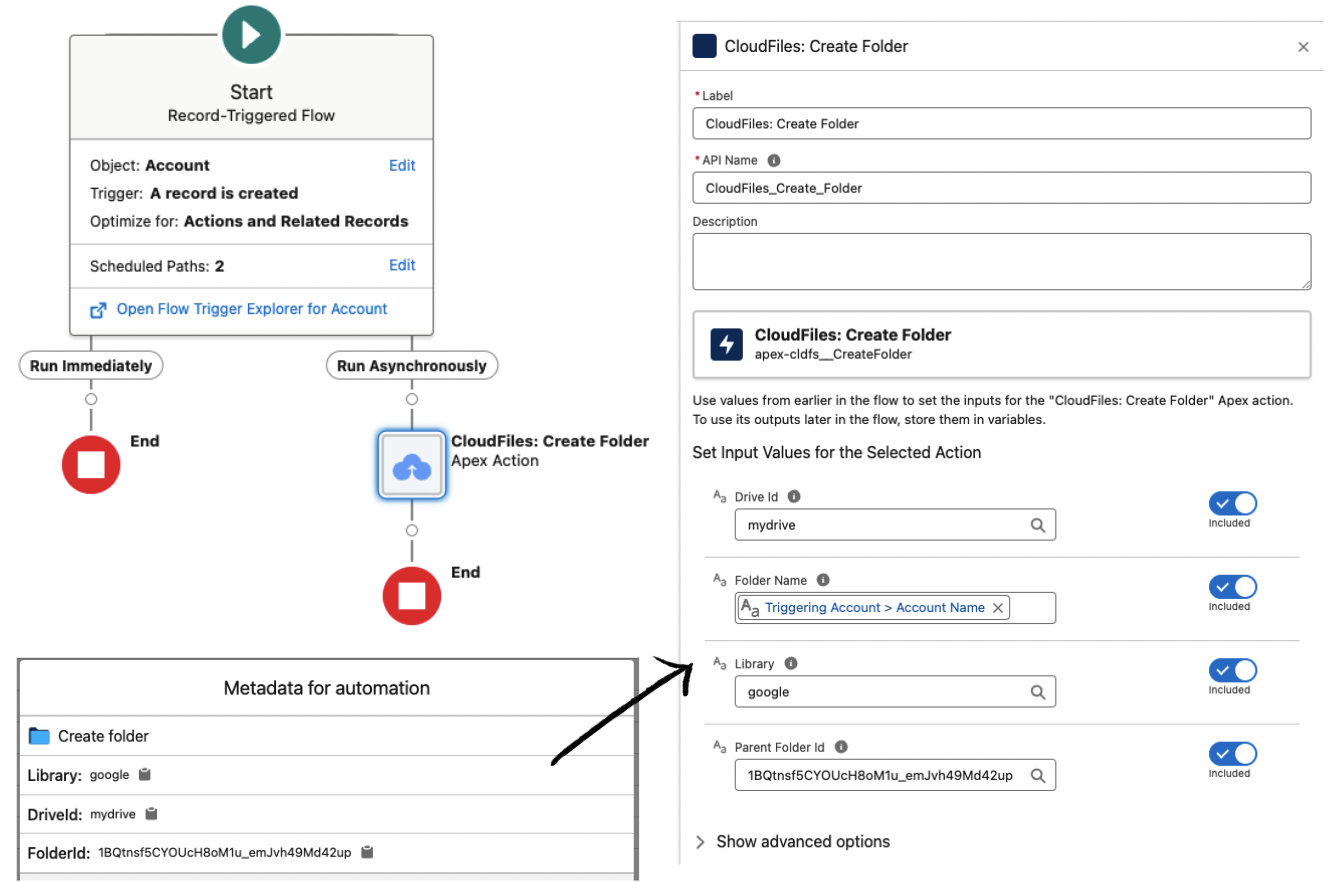
- Copy sub-folder template on record creation
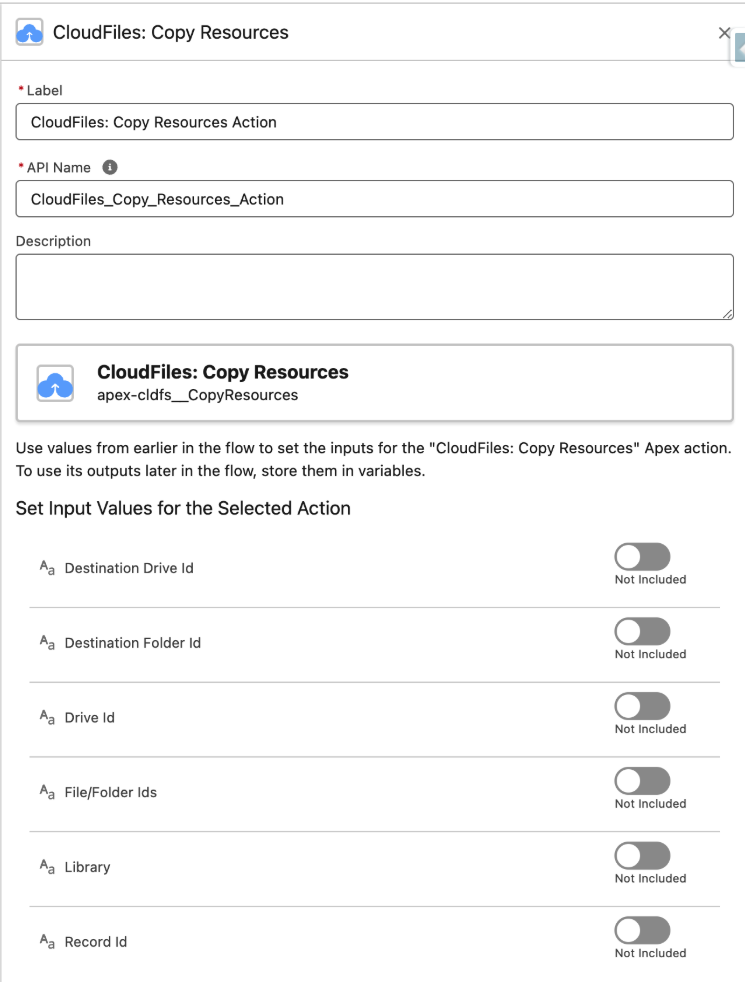
- Rename folder on record update
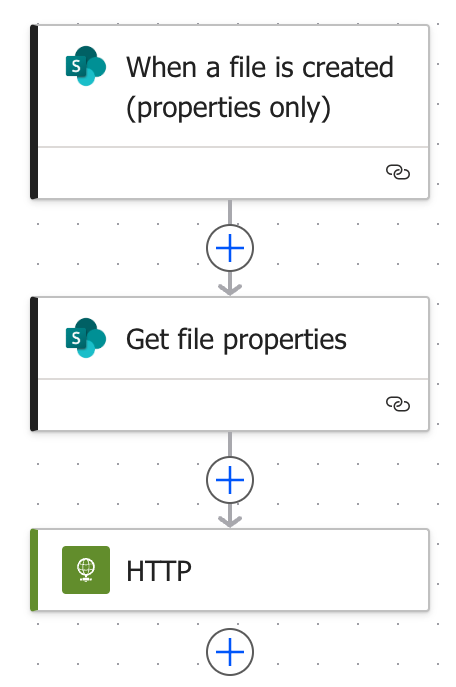
- Trigger on SharePoint file upload
d. Sharing: Branded external links with a custom domain, password, email allowlist, and expiry with no Microsoft account are required for recipients. Teams using CloudFiles share analytics report 10x more document visibility than standard SharePoint sharing.
e. Analytics: Page-level document engagement tracked in Salesforce for example who opened it, how long per page, download count. Organizations using engagement-triggered automations report 18% faster deal progression (Gartner, 2026).
f. AI Processing: Document AI reads SharePoint files and extracts structured data into Salesforce fields with no model training. Up to 80% reduction in manual data entry for document-heavy workflows.
Frequently Asked Questions
- What is external file management for Salesforce with SharePoint?
External file management means using SharePoint to store documents while managing, uploading, organizing, sharing, tracking, those documents from within Salesforce. CloudFiles makes SharePoint the storage backend while keeping all file management operations inside the CRM. - Can all file management operations be performed in Salesforce without opening SharePoint?
Yes. CloudFiles supports upload, preview, rename, replace, move, delete, folder creation, and external sharing. All from the Salesforce record page. Users never need to open SharePoint. - Does CloudFiles automate folder creation in SharePoint for Salesforce records?
Yes. CloudFiles uses Salesforce Flow and the Create Folder action to automatically create SharePoint folders when Salesforce records are created. Named from field values and linked to the record instantly. - Can CloudFiles move files between SharePoint folders from within Salesforce?
Yes. CloudFiles provides Flow actions and LWC controls for moving files between SharePoint folders. Including automated moves triggered by Salesforce record changes such as stage updates or field value changes. - Does CloudFiles support SharePoint folder templates for new records?
Yes. The Copy Resources Flow action copies a pre built SharePoint template into each new record folder. Creating a standardized sub folder structure automatically. - Can CloudFiles share SharePoint files with external contacts from Salesforce?
Yes. CloudFiles generates branded sharing links from any Salesforce record. Custom domain, password, email allowlist, expiry date, download controls. Recipients do not need a Microsoft or Salesforce account. - How does CloudFiles track SharePoint file engagement in Salesforce?
When a shared file is opened, CloudFiles records page by page time on page, unique viewer count, download events, device data, and access timestamps as Salesforce custom objects. Available in reports, dashboards, and as Flow triggers. - Can CloudFiles extract data from SharePoint files into Salesforce fields?
Yes. CloudFiles Document AI reads any SharePoint file. PDF, scanned document, Word, Excel. And automatically extracts structured data into Salesforce fields. No model training required. - Is external file management in CloudFiles available on Salesforce Experience Cloud?
Yes. The CloudFiles LWC is available for Experience Cloud pages, allowing external portal users to manage SharePoint files through Salesforce without a SharePoint license. - How does external file management through CloudFiles help reduce Salesforce costs?
By routing all uploads to SharePoint instead of Salesforce, CloudFiles eliminates file storage overage charges. Organizations report 75–90% reductions in Salesforce storage costs after deploying CloudFiles. - Why integrate SharePoint for external file management instead of using SharePoint separately?
Keeping file management inside Salesforce eliminates: - 2–3 hours/week per rep of context switching between systems
- Documents uploaded to wrong folders or missed entirely
- Version conflicts from reps working in different systems
- 40–60% document misfiling rate common in unconnected SharePoint setups
- Does CloudFiles support all SharePoint file types for external file management?
Yes. CloudFiles supports all file types in SharePoint. PDFs, Word, Excel, PowerPoint, images, videos, CAD files, and ZIP archives. File preview is available for common formats (PDF, Office, images) inline within Salesforce.