

TL;DR
MuleSoft IDP and CloudFiles Document AI both extract data from documents for Salesforce, but they are built differently. MuleSoft IDP is an extraction pipeline: it turns a document into a JSON object or an Apex class, and you then build Flows, Transform elements, and review screens yourself to get that data onto Salesforce records. CloudFiles Document AI is an agentic, end-to-end product: it auto-selects the right AI model for each task, and its Document Mapper turns a document directly into created and updated Salesforce records, including line items and lookups, with no code. If your team has MuleSoft architects and an Anypoint estate, MuleSoft IDP fits your stack. If you want documents to become Salesforce records this week, with admins doing the configuration, CloudFiles is the shorter path.
MuleSoft IDP Explained: Understanding the Two Salesforce Products
Before comparing anything, know that Salesforce sells two products under this name, and they work differently:
- MuleSoft IDP (Anypoint IDP), GA April 2024. You build "document actions" in the Anypoint Platform, publish them to Anypoint Exchange, and call them via REST API, a Mule connector, or RPA. Requires Anypoint Platform.
- MuleSoft for Flow: IDP, GA March 16, 2026. A Salesforce-native version configured in the Automation app's Document Processing tab and consumed through one Flow action called
Extract Data from Document. No Anypoint required, but it does require Einstein generative AI and a provisioned Data 360 (formerly Data Cloud) license. (Salesforce Help)
Both are quoted, contracted, and metered through MuleSoft's Automation Credits. When this article says "MuleSoft IDP," it covers both, and calls out differences where they matter.
What is MuleSoft IDP?
MuleSoft IDP is Salesforce's intelligent document processing product. In MuleSoft's own words, a document action is "a multi-step process that uses multiple AI engines to scan a document, filter out fields, and return a structured response as a JSON object". You define the fields you want (via prebuilt Invoice and Purchase Order templates, a custom schema, or up to 30 free-text prompts), pick a large language model from a supported list (GPT, Gemini, and Claude variants, routed through the Einstein Trust Layer), set per-field confidence thresholds, and optionally route low-confidence documents to human reviewers.
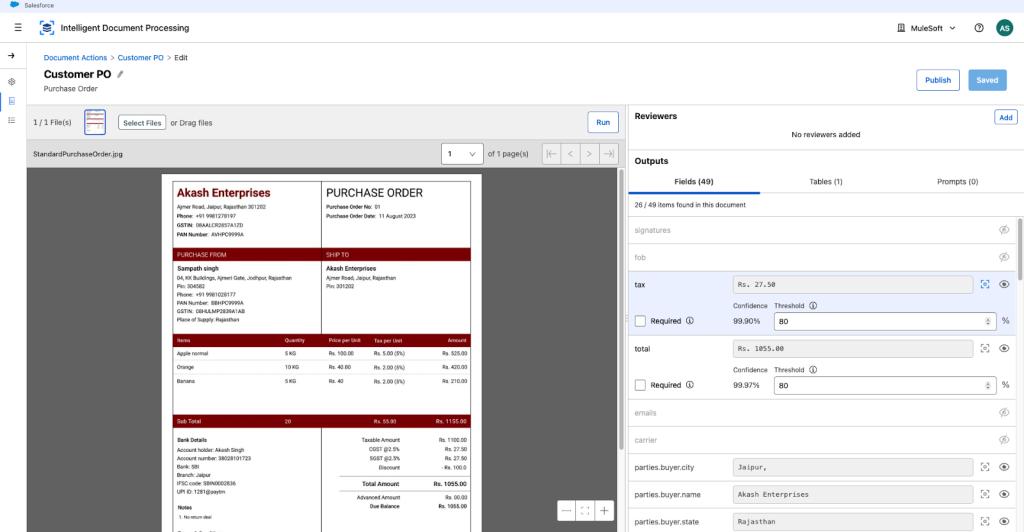
What it hands back is data, not records. The output is a JSON object (Anypoint path) or "an Apex class containing the extracted data" plus a JSON string (Salesforce-native path). Everything after extraction, including deciding what to do with the data, is yours to build in Flow.
What is CloudFiles Document AI?
CloudFiles Document AI is a document intelligence product that lives inside Salesforce as an AppExchange managed package. It reads PDFs, Word, Excel, PowerPoint, CSV, and image files, including scanned, handwritten, and multilingual documents, and turns them into Salesforce data and actions. It is agentic: instead of asking you to pick and manage AI models, it reads the task and the document and automatically determines which model and processing strategy to use for each operation.
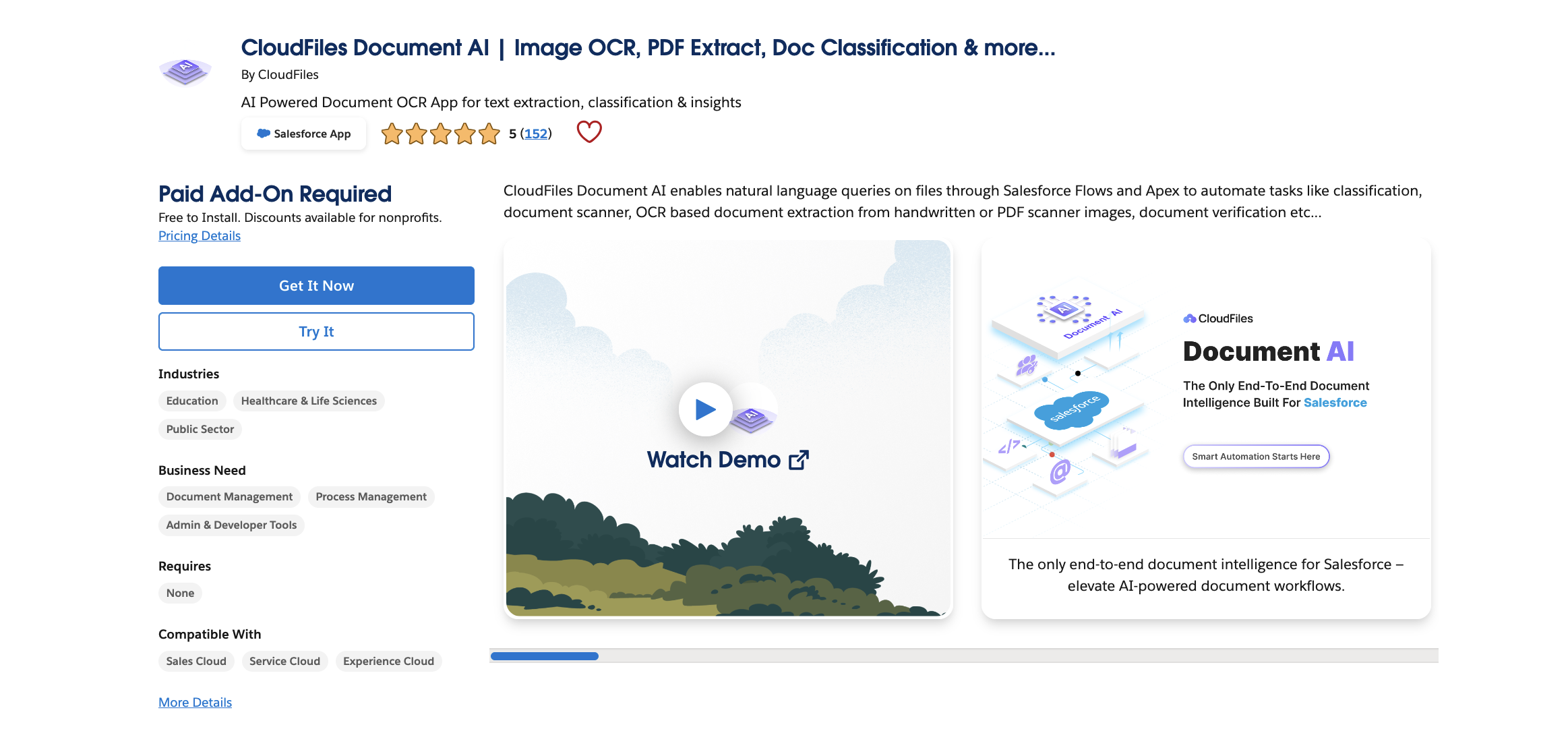
Three things sit on top of the extraction engine:
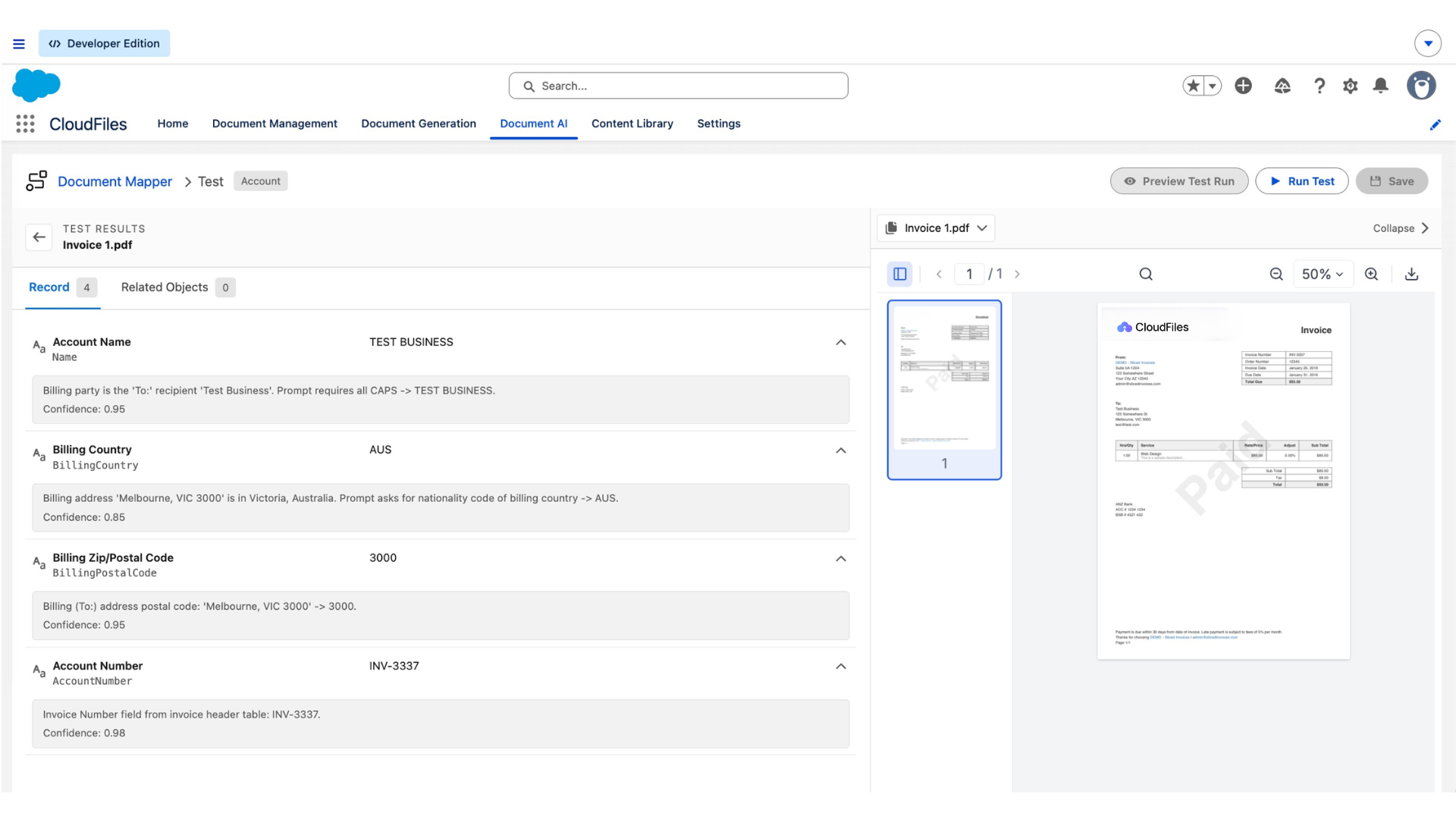
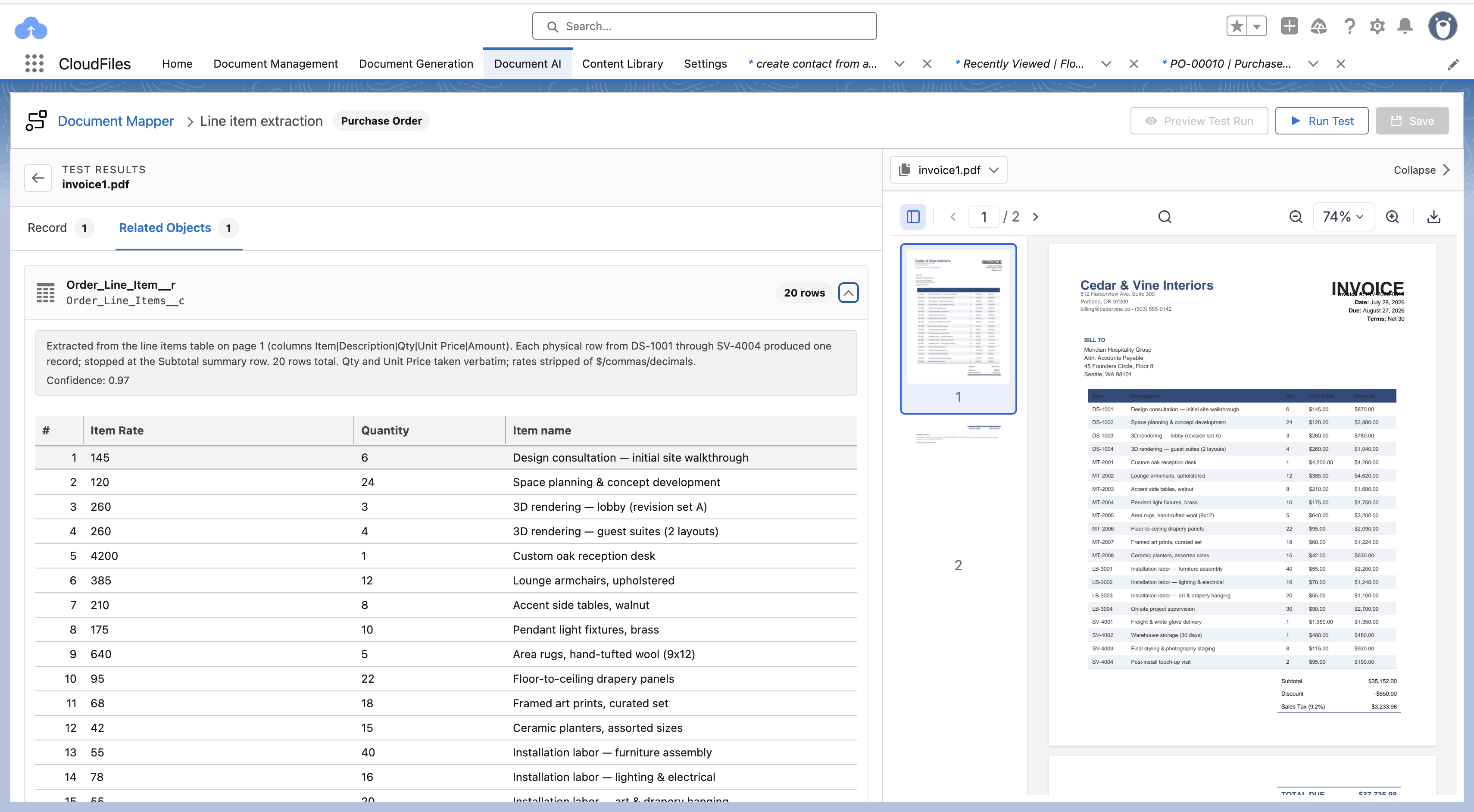
1 - Document Mapper: a no-code workspace where you pick a Salesforce object, describe each field in plain language, and the AI extracts, formats, matches lookups, and creates parent and child records in one pass. Configurations are tested against sample documents (with per-field confidence scores and reasoning) before anything is written, and every run is logged as a searchable record with one-click reprocessing.
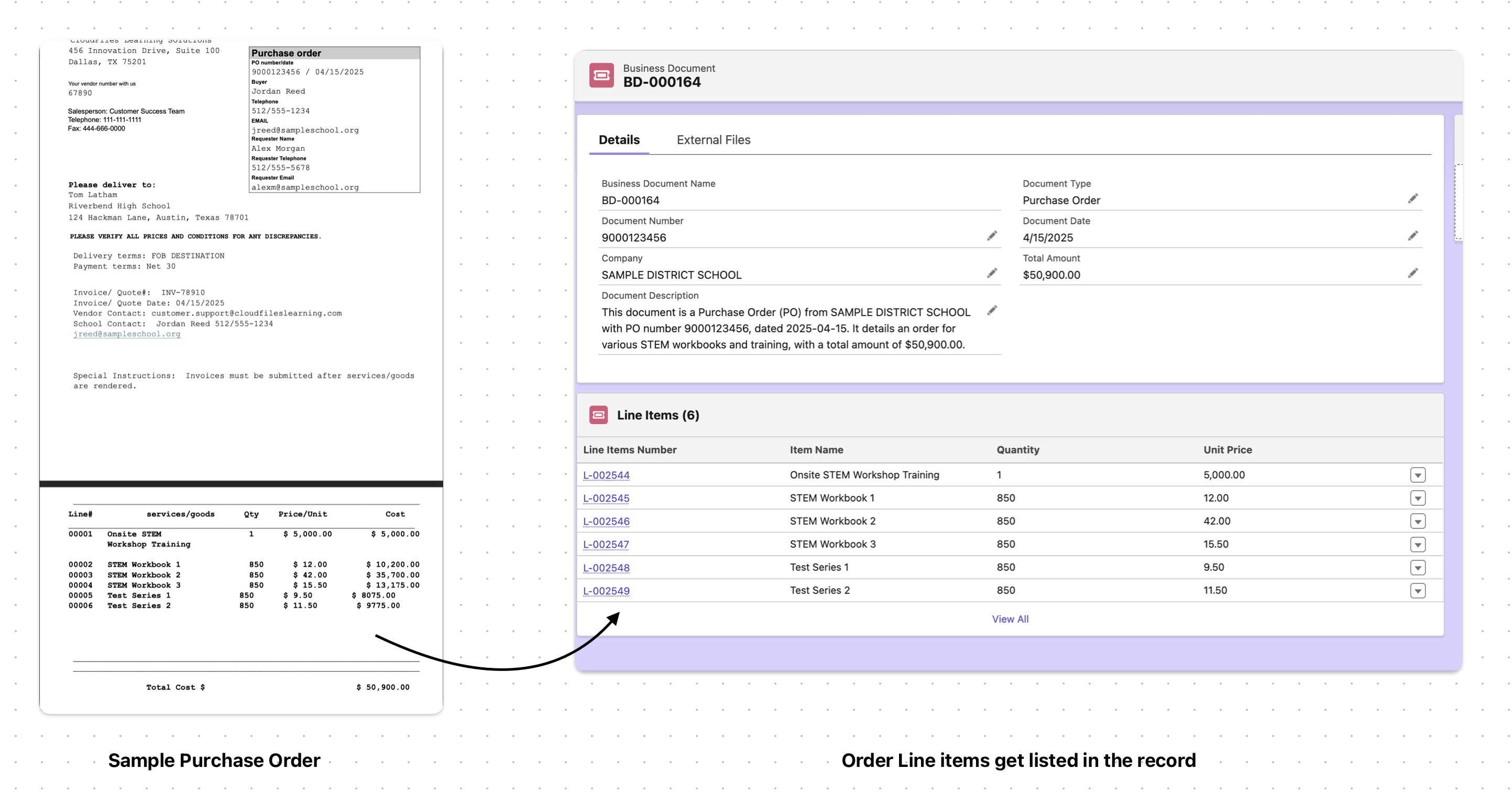
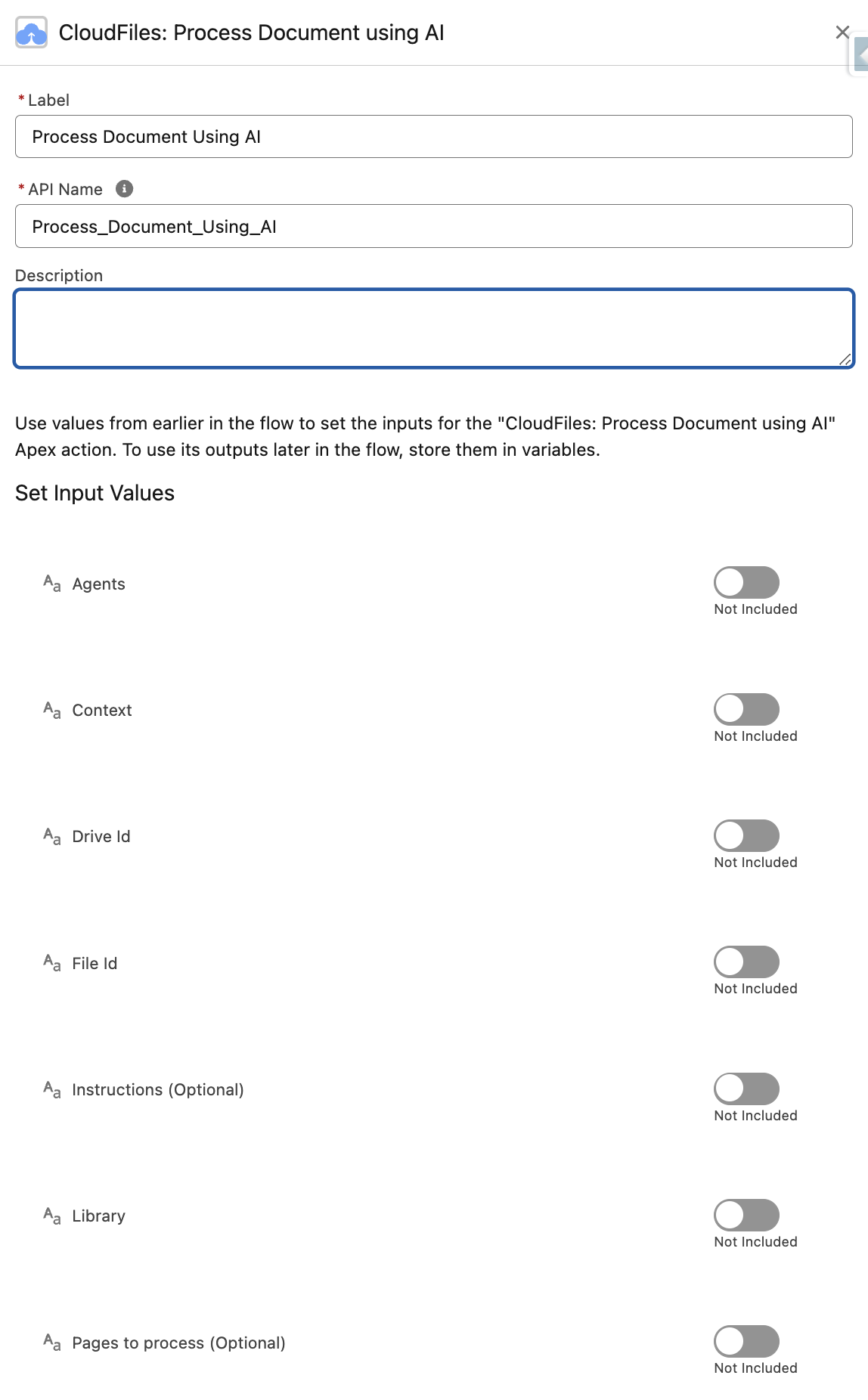
2 - Flow actions: process, query, and split documents from any Flow, so document intelligence can sit inside existing automation.
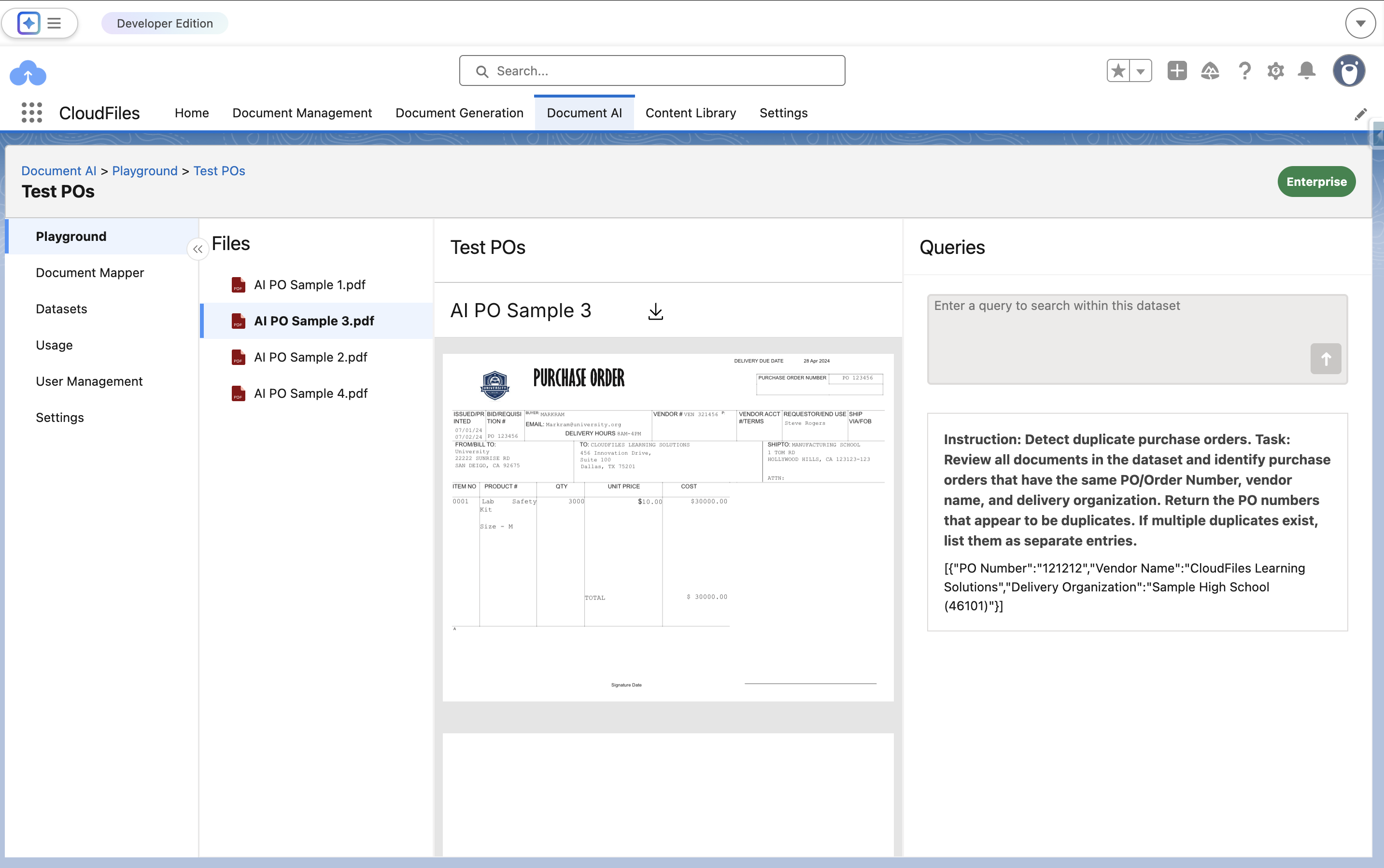
3 - Datasets: group multiple documents plus Salesforce data into one collection and query across all of it at once, for cross-document checks like duplicate detection or contract-version comparison.
Files can come from anywhere: Salesforce Files, SharePoint, Google Drive, OneDrive, S3, inbound email, or e-signature tools, with triggers that fire processing automatically when a file lands. That reach comes from CloudFiles' document management foundation, the same product family, so Document AI works with files wherever they already live.
MuleSoft IDP vs CloudFiles Document AI: comparison table
| Capability | CloudFiles Document AI | MuleSoft IDP |
|---|---|---|
| Where it runs | ✅ Inside Salesforce (AppExchange managed package) | ⚠️ Anypoint Platform, or Salesforce-native with the Flow: IDP add-on |
| Agentic processing | ✅ Yes. Auto-selects the model and strategy per task | ❌ Pipeline model. You choose the LLM per document action and author the decisions in Flow |
| Document-to-record mapping | ✅ Document Mapper: no-code, plain-language mapping to fields, picklists, lookups, and child records | ❌ None. Output is JSON or an Apex class; you map field-by-field with Flow Transform elements |
| Line items / child records | ✅ One pass creates the parent and all related records, linked automatically | ⚠️ Manual: a Loop plus a second Transform plus Create Records per child object |
| Lookup resolution | ✅ Plain-language matching plans (fuzzy, exact, or multi-step), with control over no-match and multi-match cases | ❌ Not built in; you write the matching logic yourself in Flow |
| File formats | ✅ PDF, DOCX, XLSX, PPTX, CSV, PNG, JPEG | ⚠️ PDF, PNG, JPG, TIFF only (quotas) |
| Large documents | ✅ High page counts, with selective page-range processing | ⚠️ 50 pages / 8 MB via UI upload; 150 pages / 15 MB via API |
| Document splitting | ✅ AI split action separates merged PDFs into labeled files | ❌ Not available; docs suggest separate document actions per vendor instead |
| Cross-document analysis | ✅ Datasets: query many documents plus Salesforce data together | ❌ One document per request |
| Handwriting and scans | ✅ Yes, via adaptive OCR + NLP | ✅ Yes, via multimodal LLMs |
| Query prompts in any language | ✅ Yes | ⚠️ "English prompts. Prompts in other languages are not fully supported" |
| Confidence scores + human review | ✅ Test runs show per-field confidence and reasoning before commit; failed runs are logged and reprocessable | ✅ Per-field thresholds queue documents to a review UI (Anypoint) or a review screen you build in Flow |
| Extra platform licenses required | ✅ None beyond CloudFiles | ❌ Einstein GenAI + Data 360 provisioned (native path), or Anypoint Platform; Foundations/Agentforce 1 for agent use |
| Implementation support | ✅ Free implementation support included | ❌ Not included; implementation is your team or paid partners |
| Pricing model | ⚠️ Quote-based (per-user or AI page volume) | ⚠️ Quote-only annual contract; 30 Automation Credits per document page from a shared prepaid pool |
| Self-serve trial | ✅ AppExchange install with AI Playground | ❌ No trial tier documented |
Is MuleSoft IDP agentic?
Not in the product itself. MuleSoft IDP is an extract, score, review, export pipeline, and the decisions in that pipeline (confidence routing, approvals, record writes) are authored in Flow Builder. IDP does integrate with Agentforce: document extraction can be exposed as an action an agent calls, which is genuinely useful when an agent needs document data mid-task. The extraction step itself, though, runs the configuration you define rather than deciding anything on its own.
As of July 2026 the IDP documentation describes no autonomous routing or self-correction, and on the Salesforce side there is one action, "Extract Data from Document", with two inputs. Salesforce's own example document walk you through adding "a separate decision per field" for confidence routing, and note that a single review-required output is something a future enhancement may provide.
Model choice is also on you. MuleSoft IDP asks you to pick the LLM per document action, and each choice carries documented trade-offs: Claude models support at most 16 fields per action, bounding-box callouts work only on Gemini, GPT-5.2 "does not currently meet EU data residency requirements," and checkbox accuracy varies from low to best across the list (supported models). When models are upgraded or retired (GPT-4o retires September 2026), revisiting those choices is your job.
CloudFiles Document AI inverts this. The system is agentic at the processing level: it determines which model and approach fits each task, whether that is querying a contract, reading checkboxes on a scanned form, or splitting a 500-page bundle. There is no model list to study, no per-model field caps to design around, and no migration work when the underlying models improve. You describe the outcome; the product decides the how.
How does extracted data become a Salesforce record?
This is the biggest practical difference between the two products.
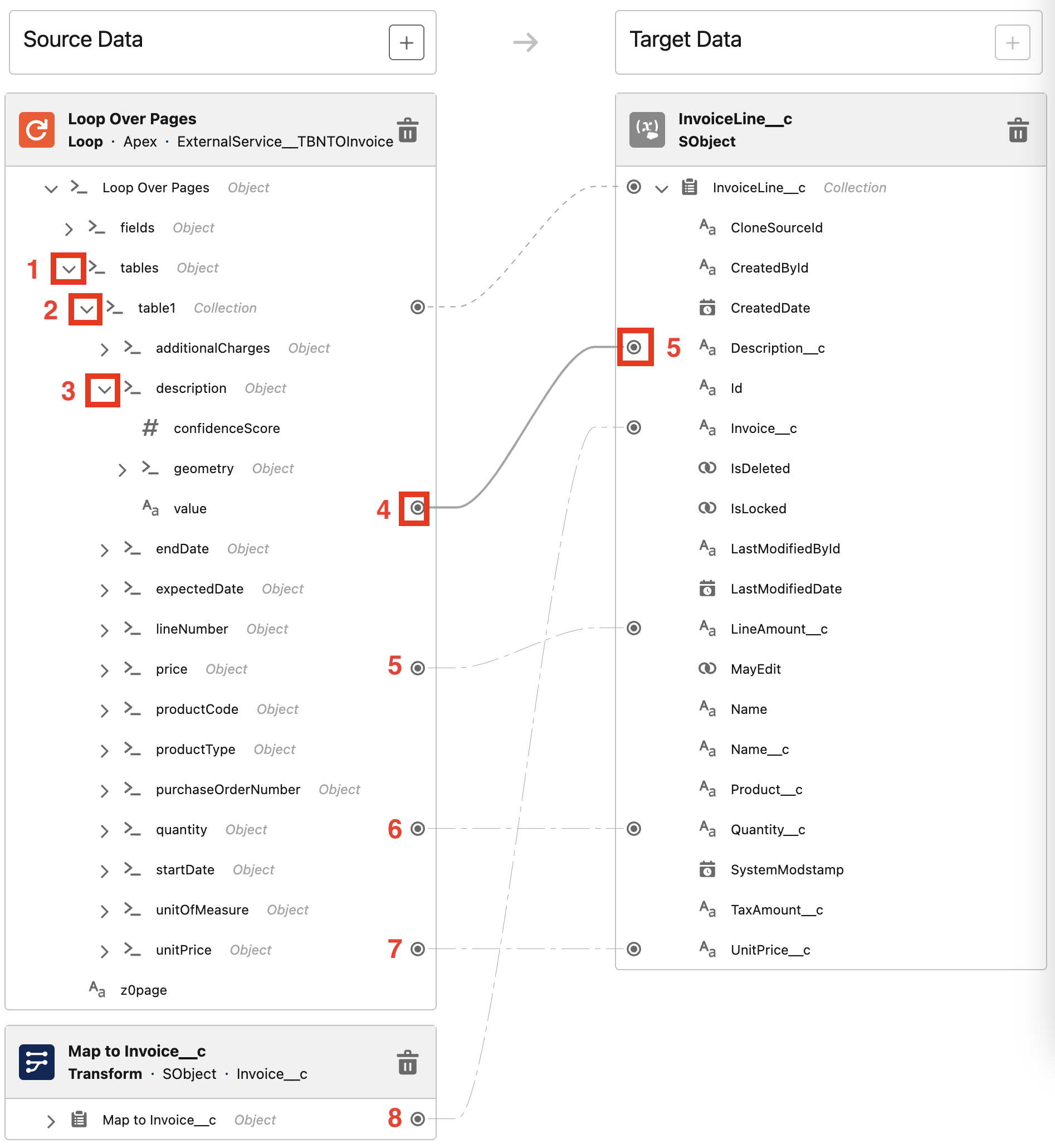
With MuleSoft IDP, extraction and record creation are two separate problems, and the product only solves the first. The extraction output is "a dynamic Apex class containing all the extracted data, which you can then use in subsequent flow elements" (Salesforce Help). Getting it onto records means Flow work: Transform elements mapping dot-paths like Loop Over Pages → fields → dueDate → value, Decision elements per field for confidence routing, Update Records or Create Records elements per object, and a Loop plus a second Transform for every child object such as invoice line items.
Salesforce's own record-triggered example (the realistic "a file was attached to a record" case) requires four coordinated artifacts: a record-triggered flow, an approval action, a flow orchestration, and a screen flow, with variables passed manually at each boundary, plus a documented data-type workaround (example). There is no visual mapper from document fields to Salesforce fields in either MuleSoft SKU.
With CloudFiles Document Mapper, mapping is the product. You pick the target object, and every field on it appears in one workspace, grouped into Main Record, Lookups, and Child Relationships.
For each field you write one plain-language line ("Extract the invoice number from the header"). Picklists are matched to your exact Salesforce values even when the document words things differently. Lookups, normally the part that needs code, are resolved by describing the match in plain language; the AI builds a matching plan (typically fuzzy, with exact or multi-step options and explicit no-match handling), and unmatched documents are held back rather than creating bad data. Child relationships read the parent and all line items in one pass and create every related record pre-linked. You test against sample documents, see every value with a confidence score and a plain-language explanation, refine, and only then publish.
The same configuration then runs from a list view button, a record page button, or a Flow action. And when a document process is too intricate for a single mapper configuration (multi-step logic, unusual branching, cross-object orchestration), CloudFiles' AI-driven Workflow Builder picks up from there: you describe the process the way you would explain it to a colleague, and it assembles the workflow from that description.
The net effect: a document with one account and a dozen line items becomes a fully linked set of Salesforce records in a single run on CloudFiles, and a multi-flow engineering project on MuleSoft.
What does setup actually require?
MuleSoft IDP (Anypoint path): MuleSoft's own hands-on workshop for connecting IDP to Salesforce is a 7-step lab with roughly 50 substeps, including connecting Salesforce to Anypoint in Setup, importing the document action as an External Service against a named credential, hard-coding Exchange IDs into Flow variables, and receiving results asynchronously through a Platform Event (Lab 5). Operational quirks are documented, not hidden: every republish of a document action creates a new connector version you must re-wire, published actions cannot be deleted (the official retirement method is renaming them "(Do not use)"), and securing callbacks properly means building two additional APIs because native access control stops at the business-group level (security best practices).
MuleSoft for Flow: IDP (native path): configuration is genuinely simpler (upload a sample, auto-extract fields, test, save), but consuming it still means building the surrounding Flows, review screens, and orchestrations yourself, as above.
CloudFiles: install the managed package from the AppExchange, connect your storage, and configure in clicks. The AI Playground lets you upload a real document and test extraction before you automate anything. A Document Mapper configuration is built, tested, and put behind a button without leaving the mapper.
What do you need to buy?
For MuleSoft IDP, the license stack depends on the path, and Salesforce states it on every documentation page (source):
- The MuleSoft for Flow: IDP add-on (quote-only, annual contract), or an Anypoint Platform relationship for the Anypoint SKU
- Einstein generative AI turned on
- Data 360 (the renamed Data Cloud) provisioned and enabled for your org
- The API access add-on if you are on Professional Edition
- Foundations or Agentforce 1 edition if any of it touches Agentforce
- Automation Credits sized to your annual page volume: IDP meters at 30 credits per document page from a prepaid pool shared with RPA, Composer, and integration tasks (credit rates)
There is no public list price for any IDP SKU and no self-serve trial documented.
For CloudFiles, Document AI is one product on one contract: per-user licensing or AI page volume, quote-based. No Data Cloud dependency, no Anypoint, no separate GenAI prerequisite. You can install from the AppExchange and test against your own documents in the Playground before buying anything.
Neither vendor publishes a full price list, so the honest comparison is shape, not numbers: CloudFiles is one line item; MuleSoft IDP is a multi-product procurement.
Where MuleSoft IDP is genuinely strong
A fair comparison should say what MuleSoft does well, and these points are real:
- If you already run Anypoint, IDP slots into an integration fabric you own: document actions publish to Exchange, run inside Mule apps and RPA bots, and inherit MuleSoft's governance model.
- Explicit model choice matters to some teams. IDP lets you pin a specific LLM per document action and see per-model behavior documented, which regulated teams may prefer over abstraction.
- Bounding-box location callouts (Gemini models) give reviewers visual grounding for extracted values, useful in audit-heavy review workflows.
If your document workload is one stage inside large Mule-orchestrated integrations, and you have the platform team to own it, MuleSoft IDP is a coherent choice.
Which should you choose?
Choose CloudFiles Document AI if:
- You want documents to become Salesforce records, not JSON, and you want admins configuring that in plain language rather than developers building Flows
- Your documents include Word, Excel, PowerPoint, or CSV files, not just PDFs and images
- You need line items, lookups, and picklists handled without code
- You want splitting, cross-document dataset queries, and multi-source triggers (email, SharePoint, Drive, e-signature) in the same product
- You want to trial on your own documents before a procurement conversation
Choose MuleSoft IDP if:
- You already license Anypoint Platform and have MuleSoft developers on staff
- Document extraction is one step inside larger Mule or RPA orchestrations that span systems beyond Salesforce
- You have (or plan) Data 360 and Einstein GenAI anyway, so the prerequisite stack is sunk cost
- You need to pin specific LLMs per workload for compliance reasons
FAQs
Is MuleSoft IDP agentic?
Not in the product itself. MuleSoft IDP is an extract, score, review, export pipeline; confidence routing and record writes are Flow elements you build. Its Agentforce integration exposes document extraction as an action an agent can call, and the extraction runs the configuration you define. CloudFiles Document AI is agentic at the processing level: it automatically determines the model and strategy for each document task.
Does MuleSoft IDP require Data Cloud?
The Salesforce-native version (MuleSoft for Flow: IDP) requires Data 360, the renamed Data Cloud, to be provisioned and enabled, along with Einstein generative AI. The Anypoint version requires Anypoint Platform instead. CloudFiles Document AI requires neither.
Does MuleSoft IDP have a Document Mapper equivalent?
No. Neither MuleSoft SKU has a visual mapper from document fields to Salesforce objects. Extraction output is a JSON object or dynamic Apex class, and mapping to records is done manually with Flow Transform, Decision, and Create/Update Records elements.
What file formats does MuleSoft IDP support?
PDF, PNG, JPG, and TIFF (quotas and limits). Office formats are not supported. CloudFiles Document AI supports PDF, DOCX, XLSX, PPTX, CSV, PNG, and JPEG.
How much does MuleSoft IDP cost?
Salesforce publishes no list price. IDP is sold on an annual, quote-only contract and metered at 30 Automation Credits per document page from a prepaid pool shared across MuleSoft automation products. Budget additionally for the prerequisite licenses (Einstein GenAI, Data 360, and edition add-ons where applicable).
Can MuleSoft IDP split a merged PDF into separate documents?
No splitting capability is documented. MuleSoft's guidance is to create separate document actions for differing document types. CloudFiles includes an AI split action that separates merged PDFs into individually labeled files and fires an event for follow-up automation.
Can CloudFiles Document AI and MuleSoft IDP coexist?
Yes. Some teams use MuleSoft for system-to-system integration while using CloudFiles for document-to-record workflows inside Salesforce. They solve different problems: MuleSoft moves data between systems; CloudFiles turns documents into Salesforce records and actions.
Is there a free trial of MuleSoft IDP?
No trial tier is documented, and IDP is not available on free Anypoint accounts. CloudFiles can be installed from the AppExchange and tested against your own documents in the AI Playground.
Disclaimer: This comparison was written by the CloudFiles team and fact-checked against MuleSoft and Salesforce documentation current as of July 28, 2026. Product capabilities change; if anything here is out of date, tell us at marketing@cloudfiles.io and we will correct it. Sources: MuleSoft IDP docs, Salesforce Help: document processing, MuleSoft Automation pricing, CloudFiles help docs.