

If your team lives in Salesforce but your files live in SharePoint, you already know the friction. Sales reps hunt for the right document, switch tabs, lose context, and do it again the next day. For a 50-person sales team, that tab-switching adds up to an estimated 5,000–7,500 hours a year spent navigating, not selling.

The fix isn't a workaround. It's a proper integration that lets you manage SharePoint files directly inside Salesforce, without ever leaving the CRM.
CloudFiles Document Management is purpose-built for this, which is available on AgentExchange (formerly AppExchange). Used by 1,200+ Salesforce teams, it connects SharePoint to every Salesforce record with full read-write access, automated folder creation, bidirectional sync, and sharing analytics, all without leaving Salesforce.
Why Browsing SharePoint Isn't the Same as Managing It
Most SharePoint–Salesforce connectors on AppExchange offer read-only access. You can browse. That's it.
Salesforce's own Files Connect works this way - no uploading, no folder creation, no sync. Many third-party alternatives aren't much different. If you need to upload a contract, organise files by record, or share a document with a client link, you're back in SharePoint manually.
CloudFiles replaces that entirely. Here's how the capabilities stack up:
| Capability | Files Connect | Share Connect | CloudFiles |
|---|---|---|---|
| Browse SharePoint files | ✓ | ✓ | ✓ |
| Upload from Salesforce | ✗ | Limited | ✓ |
| Real-time bidirectional sync | ✗ | ✗ | ✓ |
| Auto folder creation per record | ✗ | ✗ | ✓ |
| Bulk migration to SharePoint | ✗ | ✗ | ✓ |
| Branded sharing + analytics | ✗ | ✗ | ✓ |
| Document AI / OCR | ✗ | ✗ | ✓ |
| 50+ Flow actions | ✗ | ✗ | ✓ |
| HIPAA + SOC2 + ISO 27001 + GDPR | ✗ | ✗ | ✓ |
For detailed analysis, refer to these comparison pages
See how CloudFiles compares with Files Connect
See how CloudFiles compares with Share Connect
Key Features That Make CloudFiles the Clear Choice
Native File Management on Every Record
CloudFiles adds a native Lightning Web Component to any Salesforce object - Accounts, Opportunities, Cases, and custom objects. From there, your team can browse, upload, preview, rename, and share SharePoint files without switching applications.
Automated Folder Creation
When a new record is created in Salesforce, CloudFiles can automatically create a corresponding SharePoint folder - named from record fields like account name or opportunity ID. No manual setup per record, no inconsistent folder naming. How to set up folder automation →
Sharing with Analytics
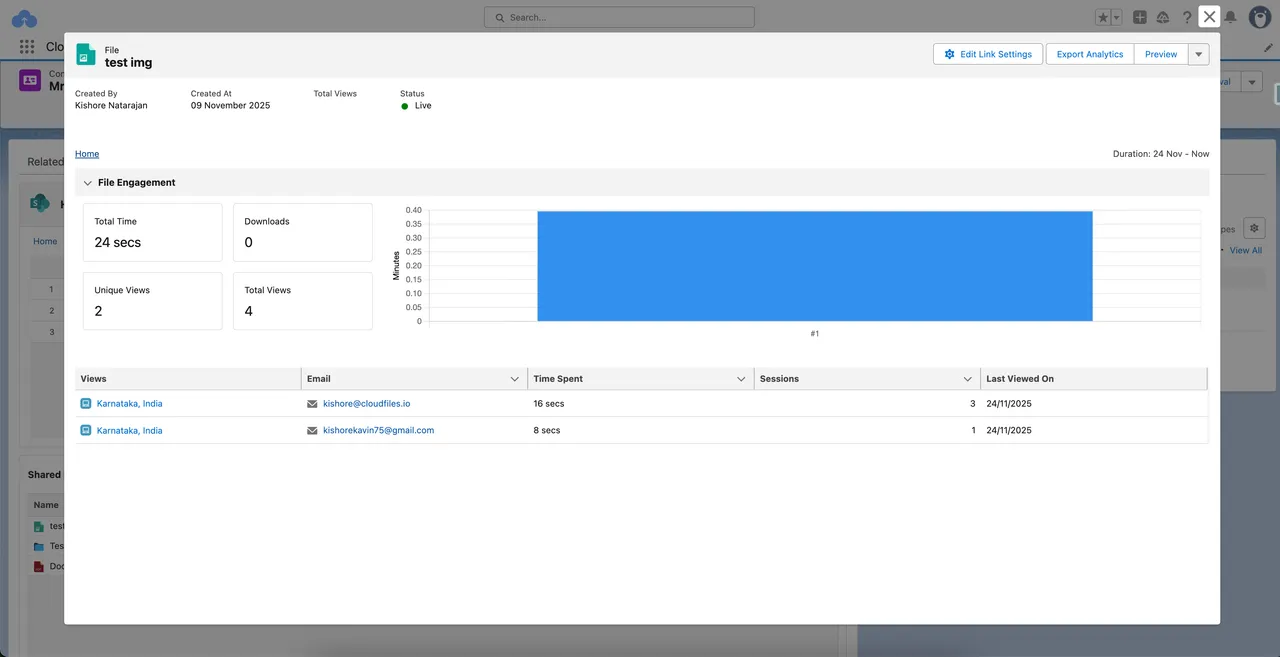
Instead of standard SharePoint links, CloudFiles generates branded external sharing links with page-level engagement tracking stored as Salesforce objects. You can see exactly who viewed a document, for how long, and when. That's a level of visibility that standard SharePoint sharing doesn't come close to matching.
Document AI
For teams handling high volumes of documents, be it contracts, invoices or onboarding forms, CloudFiles' Document AI can extract structured data from SharePoint files directly into Salesforce fields.
Getting Started
CloudFiles installs directly from AppExchange — see current pricing. The quick start guide walks you through connecting your first SharePoint library to a Salesforce object in under an hour.
Key Takeaways
- Most SharePoint–Salesforce connectors offer read-only browsing, not true file management
- CloudFiles provides full read-write access, bidirectional sync, and 50+ Flow actions from inside any Salesforce record
- Automated folder creation eliminates per-record manual setup and significantly reduces native Salesforce storage usage
- Sharing analytics gives your team document-level visibility that standard SharePoint links don't provide
- Independently audited for SOC 2 Type II, certified to ISO 27001, and compliant with HIPAA and GDPR, suitable for regulated industries
Want to explore more? Feel free to book a call
Frequently Asked Questions
What is the best app to manage SharePoint files in Salesforce?
CloudFiles Document Management is the leading SharePoint–Salesforce integration on AppExchange, rated 5★ and used by 2,000+ teams. Unlike read-only alternatives, CloudFiles supports uploading, folder automation, bidirectional sync, sharing analytics, and Document AI, all from inside Salesforce records.
Can I upload files to SharePoint from Salesforce?
Yes, with CloudFiles, you can upload, rename, preview, and organise SharePoint files directly from any Salesforce record using the native Lightning Web Component. No need to open SharePoint separately.
Does CloudFiles automatically create SharePoint folders for new Salesforce records?
Yes. CloudFiles uses Salesforce Flow to create SharePoint folders automatically when a new record is added, using field values from the record. This works for standard objects like Accounts and Opportunities, as well as custom objects.
Is CloudFiles secure enough for regulated industries?
CloudFiles is independently audited for SOC 2 Type II, certified to ISO 27001, and compliant with HIPAA and GDPR, making it one of the few Salesforce document management apps meeting all four standards. Your files stay in your own SharePoint storage — CloudFiles never re-hosts them.
How is CloudFiles different from Salesforce Files Connect?
Files Connect provides read-only access to SharePoint. You can browse files but not upload, sync, or automate anything. CloudFiles replaces this with full bidirectional file management, Flow automation, sharing analytics, and Document AI built directly into Salesforce.