

Overview
Salesforce is the market leader in the world of CRMs. A CRM system has to keep a lot of files like proposals, contracts, RFPs, invoices etc. Salesforce provides an easy way to upload files at various places like the notes & attachment section on a record, chatter feed, the dedicated files tab etc. While this gets the job done at times, Salesforce really isn’t the tool for file storage. As the storage needs increase, Salesforce gets pretty expensive, very fast.
Exceeding storage limits in Salesforce can pose significant challenges, particularly when files size limits are surpassed. When encountering a "storage limit exceeded" error, it's essential to assess file size limits within Salesforce, especially concerning file uploads. Whether it's managing large datasets or handling extensive file attachments, staying within Salesforce's storage boundaries is crucial for seamless platform operation and avoiding disruptions due to storage limit exceeded errors.
In this article, we will talk about the file storage limits in Salesforce and the ways to keep the file storage cost in check.
Who are we?

At CloudFiles, we specialize in creating seamless integrations between Salesforce and various external file storage platforms, including Google Drive, SharePoint and others. Our mission is to simplify your data management, cut costs, and enhance customer engagement. Discover the power of CloudFiles on AppExchange and revolutionize your Salesforce document experience.
Types of Storage in Salesforce
Salesforce storage is categorized into two main types: Data & File storage, with an additional classification, Big Object storage, for specialized scenarios. Here's a brief breakdown -
- Data Storage: Reserved for Salesforce object data such as accounts, contacts, and opportunities.
- File Storage: Allocated space for files uploaded to Salesforce, including attachments and user photos.
- Big Objects: Tailored for extensive data storage without compromising performance, ideal for scenarios involving large-scale records.
File and Data Storage limits in Salesforce
Salesforce splits storage into two categories that are allocated differently. Salesforce's own storage allocation reference gives the base figures per edition:
| Salesforce Edition | File Storage per Org | Data Storage per User License |
| Contact Manager, Group, Professional, Enterprise | 10 GB | 20 MB |
| Performance, Unlimited | 10 GB | 120 MB |
| Essentials, Starter | 1 GB | N/A |
File storage is a flat per-org number, not a per-user one. Unlike data storage, it does not grow with the number of licensed users you add: Contact Manager through Unlimited all sit at a 10 GB base regardless of headcount, according to Salesforce's own reference above.
You'll see a different formula, "10 GB plus 2 GB per user license," repeated across a number of third-party guides to Salesforce storage. It does not appear in Salesforce's own allocation table, and none of the pages repeating it link to a source. We're not able to verify it, so treat it as unconfirmed until Salesforce documents it somewhere citable. For the full breakdown of where this figure comes from and what real orgs actually show, see Salesforce file storage limits, the verified facts. The one reliable number for your org is the one on your own Storage Usage page, covered below.
What happens if you run out this storage?
As your Salesforce storage nears its limit, there isn't an immediate alert as one might expect. Instead, Salesforce provides a grace period, permitting usage up to approximately 110% of your allocated storage before potential issues emerge.
However, once you hit this storage limit, further uploads and record creations will be blocked, leading to errors throughout your org and eventual breakdown of functionality. To prevent such disruptions, it's advisable to regularly monitor your org’s storage usage and proactively remove outdated records and files. However, maintaining storage within limits can be challenging in practice.

How to check your storage usage in Salesforce?
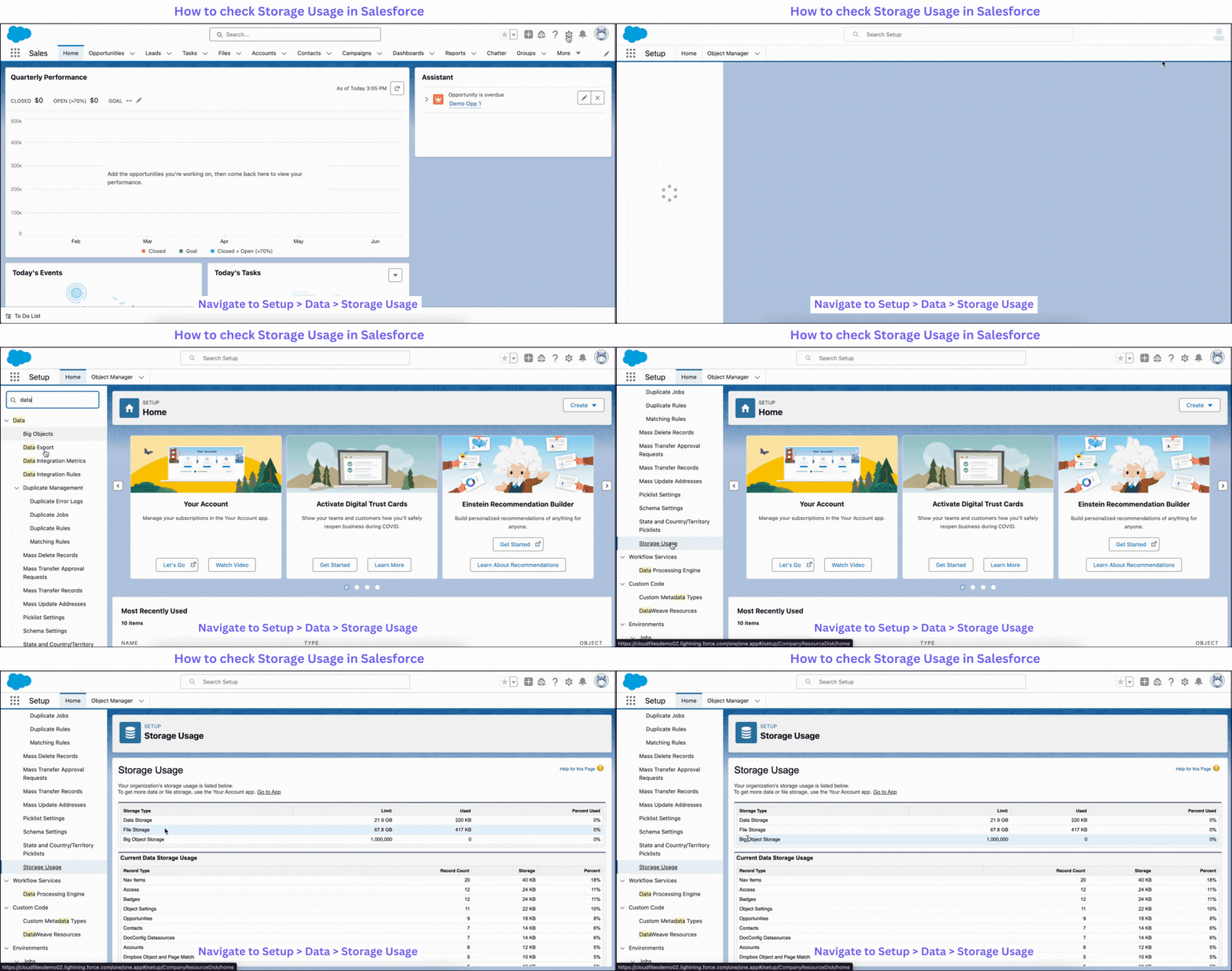
You can track your organization's storage usage in Salesforce by navigating to Setup > Data > Storage Usage. Here, you'll find a breakdown of storage usage by data, files, and big objects, along with a list of top storage users.
How do I buy additional storage in Salesforce?
To purchase additional storage, access the Your Account app within Salesforce Setup. Navigate to Setup > Your Account > Browse & Buy, and locate the File Storage section. From there, you can buy additional storage for your org in multiples of either 10 GB or 1 TB.
What is the cost of additional file storage in Salesforce?
Salesforce does not publish a per-GB overage price. "$5 per GB per month" appears across several third-party blogs and calculators, but none of them cite a source, and it does not appear on Salesforce's own pricing or Help pages.
What actually determines your cost is your contract. Additional storage is purchased in the Browse & Buy flow above, in multiples of 10 GB or 1 TB, and the rate your org is quoted there reflects your own agreement with Salesforce rather than a fixed list price. For a number you can plan against, ask your Salesforce account executive for your org's real rate instead of relying on a figure repeated online.
The storage bill is the symptom, not the problem
Almost every org that goes looking for this number finds a second thing at the same time: nobody can say which retention policy covers the documents sitting in Salesforce, who still has access to the ones attached to closed opportunities, or which version a customer was actually sent. The storage line is simply the first place the problem shows up on an invoice.
Moving files to SharePoint, Google Drive or S3 fixes both, and the second one is the one that matters at renewal. CloudFiles connects Salesforce to the storage your company already governs: each record gets its folder automatically, storage permissions mirror Salesforce team membership, sharing is tracked and revocable, and Document AI reads what arrives back into your fields. Your Salesforce storage consumption falls as a consequence, that is the smallest of the reasons to do it.
How to integrate external file system with Salesforce
Salesforce is highly customizable, hence it’s very easy to integrate it with an external file system like Google Drive, SharePoint, etc. You can build an integration using Salesforce file connect or use a connector app from AppExchange. It is generally cheaper to pick a connector app than to build the integration in house.